
English
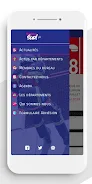
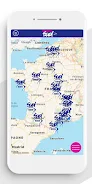
SUD SDIS is a compact operational tool designed for emergency responders and coordination teams. It centralizes incident reports, resource tracking, and routing while providing fast alerts and map overlays. The app prioritizes clarity and quick access to critical information for field teams and command centers.
SUD SDIS provides a focused set of capabilities for managing incidents, assigning vehicles and personnel, and keeping a live situational view. It aims to reduce radio chatter and paperwork by providing structured incident forms, up-to-date unit statuses, and a visual timeline of operations. The app is tuned for speed and reliability in constrained network conditions.
The design emphasizes readability under stress: large icons, color-coded statuses, and minimal menus. Maps and lists update in near real-time, and the app keeps battery consumption in mind by adjusting GPS polling rates dynamically. SUD SDIS avoids flashy UI effects in favor of predictable behavior that teams can rely on during long shifts.
Integration points include direct links to dispatch systems, exportable incident logs for after-action review, and role-based access for command staff, chiefs, and field responders. Teams can customize notification rules so that only relevant members receive specific alerts, keeping attention focused where it matters most.
SUD SDIS includes tools for quick reporting and record keeping: photo attachments, voice notes, and predefined checklists for common incident types. The app stores a compact operational log with filtering by unit, incident, or timeframe, and supports secure exports for archival or reporting purposes.
Administrators can set up unit lists, assign default response roles, and tailor incident templates to match local protocols. Color schemes and map layers are adjustable so that teams can emphasize hydrants, hazardous material sites, or evacuation routes depending on the mission. Local configurations help the app remain useful across different regions and service structures.
Getting started takes just a few steps: install, authenticate with credentials from your organization, and sync unit rosters. New users should spend a short session learning how to mark status changes and attach photos to incidents. Practice drills with the app will expose configuration gaps and help staff adopt consistent habits for faster responses.
The app applies encrypted communications for sensitive data and supports multi-factor authentication where required. Local caching and concise data payloads reduce bandwidth usage. SUD SDIS logs actions with timestamps, producing an auditable trail suitable for reviews and debriefs without exposing unnecessary personal data.
Teams appreciate the pragmatic mix of mapping, resource coordination, and incident documentation. The focused feature set reduces learning overhead while delivering measurable improvements in response visibility. Organizations that adopt SUD SDIS report smoother handovers, faster arrival times, and clearer post-incident reporting.
Download the APK through your organization’s distribution channel or approved app repository. Grant location permissions and network access during setup, then complete a brief configuration to load unit lists and incident templates. Routine updates are delivered as incremental packages to keep downtime minimal.
SUD SDIS is not a replacement for formal dispatch systems but complements them by providing a field-friendly interface that emphasizes speed, clarity, and dependable operation. For teams looking to tighten coordination and reduce administrative friction, it’s a practical tool that adapts to real-world emergency workflows.

BIG Phone for Seniors
Size:10.01M CommunicationFree Adblocker Browser
Size:188.40M CommunicationSoundCloud
Size:95.60M CommunicationInst Saver Post Story Saver
Size:11.13M CommunicationVani Dialer
Size:35.25M CommunicationSimple SMS Messenger
Size:19.80M CommunicationOH Web Browser - Safe & Simple
Size:11.00M CommunicationOpera Browser
Size:81.10M CommunicationLearna AI
Size:69.30M CommunicationNext SMS
Size:32.34M CommunicationWhatsAuto - Reply App
Size:17.10M CommunicationTumblr
Size:24.10M CommunicationApril 2024 Clash of Clans Update: Unveiling a Fresh Companion, Enhanced Levels, Chat Tagging, and Be
2024-04-16Arrival of Genshin Impact 4.6 Update: 'Embers of Two Realms, Twilight of Crimson'
2024-04-16V2.2 of the Farlight 84 update introduces an overhauled Season structure, fresh in-game currency, an
2024-04-16Monster Never Cry is now accessible on both Android and iOS mobile devices.
2024-04-18PUBG Mobile Teams Up with Bentley Motors: Luxury Cars, Exclusive Collectibles, and Beyond
2024-04-18March 2024 Free Redemption Codes for Honkai: Star Rail
2024-04-18


















