English
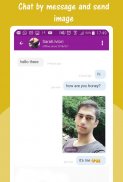
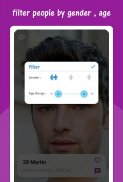
Wanna Chat is a lightweight messaging platform designed for fast, private conversations and group coordination. It combines text, voice, and video with an emphasis on simple navigation and reliable delivery, making it suitable for casual chats, small teams, and anyone who values speed and clarity in mobile communication.
Wanna Chat presents a modern messaging experience that balances core communication tools with a minimal learning curve. The app focuses on clean visuals, quick load times, and features that support both one-on-one chats and group interactions without overwhelming users with complexity.
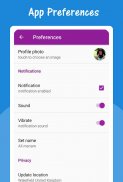
The user interface keeps controls within thumb reach. A bottom navigation bar separates chats, contacts, and settings. Conversation threads use compact bubbles and subtle timestamps to avoid clutter. Settings are grouped into familiar sections so new users can personalize notifications, data usage, and privacy without digging through menus.
Wanna Chat offers themes, chat-specific wallpapers, and custom notification tones so conversations feel distinct. Users can create quick replies, set status messages, and choose whether media auto-downloads under cellular or Wi-Fi to manage data consumption.
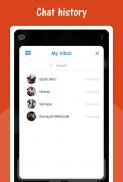
Messages send almost instantly thanks to efficient synchronization protocols. If a recipient is offline, messages queue and deliver when they reconnect. The app supports message editing and deletion within a configurable time window, and archived chats allow users to hide conversations without deleting history.
Groups support threaded replies and reactions to simplify following multiple sub-conversations. Admin controls let creators approve new members, remove participants, or assign moderators. For larger communities, announcement-only channels can be used to broadcast information without opening replies.
Privacy controls are accessible and transparent. Users can lock the app with biometrics, control who sees their last seen status, and enable two-step verification for account recovery. End-to-end encryption is available for private chats, and the app explains encryption status in each conversation to keep users informed.
Wanna Chat minimizes stored metadata where possible and lets users clear caches or scheduled backups. Backup options include encrypted cloud saves or local export, and media retention settings help free storage automatically after a set time.
The app is optimized to run on a wide range of Android devices. Animations are modest to conserve battery, and adaptive image loading keeps bandwidth usage low. On slower networks, the app gracefully downgrades video quality and prioritizes text delivery to maintain responsiveness.
Sessions can be synced across multiple devices, allowing messages to appear on a tablet or secondary phone. Session management shows where you're logged in and lets you remotely log out of devices you no longer use.
Installation is straightforward from any app store: create an account with a phone number or email, verify, and import contacts you want to message. Initial setup includes theme selection and basic privacy preferences so you can jump into conversations immediately.
Wanna Chat positions itself as a practical, no-nonsense messaging option. It blends essential collaboration tools with polished performance, making it useful for everyday social use and small team coordination.


BIG Phone for Seniors
Size:10.01M CommunicationFree Adblocker Browser
Size:188.40M CommunicationSoundCloud
Size:95.60M CommunicationInst Saver Post Story Saver
Size:11.13M CommunicationVani Dialer
Size:35.25M CommunicationSimple SMS Messenger
Size:19.80M CommunicationOH Web Browser - Safe & Simple
Size:11.00M CommunicationOpera Browser
Size:81.10M CommunicationLearna AI
Size:69.30M CommunicationNext SMS
Size:32.34M CommunicationWhatsAuto - Reply App
Size:17.10M CommunicationTumblr
Size:24.10M CommunicationApril 2024 Clash of Clans Update: Unveiling a Fresh Companion, Enhanced Levels, Chat Tagging, and Be
2024-04-16Arrival of Genshin Impact 4.6 Update: 'Embers of Two Realms, Twilight of Crimson'
2024-04-16V2.2 of the Farlight 84 update introduces an overhauled Season structure, fresh in-game currency, an
2024-04-16Monster Never Cry is now accessible on both Android and iOS mobile devices.
2024-04-18PUBG Mobile Teams Up with Bentley Motors: Luxury Cars, Exclusive Collectibles, and Beyond
2024-04-18March 2024 Free Redemption Codes for Honkai: Star Rail
2024-04-18