English
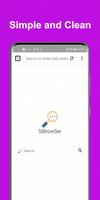
SiBrowSer is a compact, privacy-minded Android browser built for speed and practical browsing. It combines streamlined navigation, robust tab controls, and lightweight resource use to deliver fast page loads and a clutter-free interface, suitable for users who want a no-nonsense alternative to mainstream mobile browsers.
SiBrowSer aims to simplify everyday web tasks without sacrificing control. The app focuses on quick startup times, efficient memory handling, and straightforward settings. Instead of layering on complicated features, SiBrowSer prioritizes essentials like secure connections, ad mitigation, and persistent sessions so you can browse reliably on a range of devices.
The design centers on usability. Key elements include a fast rendering engine, integrated search bar, and a compact tab manager that lets you switch contexts with a single swipe. A built-in download manager tracks files and resumes interrupted transfers, while a reading mode strips away distractions for long-form content. SiBrowSer also supports private sessions that clear history and cookies on demand.
Performance is handled through lightweight processes and conservative background activity. The interface prioritizes readability: large icons, minimal chrome, and a customizable toolbar that puts frequently used actions within reach. SiBrowSer performs well on older phones, offering fluid scrolling and responsive touch gestures that feel intentionally sparse and uncluttered.
For productivity-focused users, SiBrowSer includes features that streamline common workflows. Tab grouping helps organize research sessions, while a quick-share sheet makes it easy to send links to messaging apps or cloud storage. The search suggestions are tailored to the default provider, and you can add multiple search engines for fast lookups from the address bar.
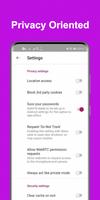
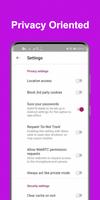
SiBrowSer provides granular privacy toggles. Users can enable tracker blocking, force HTTPS connections where available, and manage site permissions such as camera or location access. A simple privacy dashboard shows what’s been blocked and allows one-tap clearing of cookies or local storage, making it straightforward to maintain a lean browsing profile.
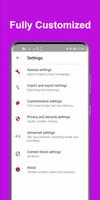
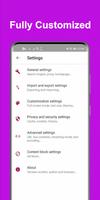
Though minimalist by default, SiBrowSer offers customization where it matters. Choose from a handful of themes, reposition the navigation controls for left- or right-handed use, and enable compact mode to reduce toolbar height. Advanced users can configure privacy presets and adjust the cache size to balance speed and storage use.
Users often note the clarity of the reading experience and the low battery impact. SiBrowSer avoids excessive background sync and minimizes push activity, which helps conserve power during extended use. The predictable behavior of tabs and the ability to pin frequently used sites contribute to a steady, distraction-free rhythm when browsing.
Installing SiBrowSer is straightforward: download, grant basic permissions, and optionally import bookmarks from another browser. An onboarding flow highlights privacy features and tab gestures, so new users can tailor the app within a few minutes. The settings are grouped logically, reducing the time spent hunting for specific controls.
SiBrowSer is a strong choice if you want a browser that respects system resources and offers clear privacy controls without complex menus. Its combination of intuitive gestures, compact design, and efficient feature set makes it a practical daily driver for users who value speed and simplicity. If you prefer a lightweight alternative that puts essentials first, SiBrowSer is worth trying.


BIG Phone for Seniors
Size:10.01M CommunicationFree Adblocker Browser
Size:188.40M CommunicationSoundCloud
Size:95.60M CommunicationInst Saver Post Story Saver
Size:11.13M CommunicationVani Dialer
Size:35.25M CommunicationSimple SMS Messenger
Size:19.80M CommunicationOH Web Browser - Safe & Simple
Size:11.00M CommunicationOpera Browser
Size:81.10M CommunicationLearna AI
Size:69.30M CommunicationNext SMS
Size:32.34M CommunicationWhatsAuto - Reply App
Size:17.10M CommunicationTumblr
Size:24.10M CommunicationApril 2024 Clash of Clans Update: Unveiling a Fresh Companion, Enhanced Levels, Chat Tagging, and Be
2024-04-16Arrival of Genshin Impact 4.6 Update: 'Embers of Two Realms, Twilight of Crimson'
2024-04-16V2.2 of the Farlight 84 update introduces an overhauled Season structure, fresh in-game currency, an
2024-04-16Monster Never Cry is now accessible on both Android and iOS mobile devices.
2024-04-18PUBG Mobile Teams Up with Bentley Motors: Luxury Cars, Exclusive Collectibles, and Beyond
2024-04-18March 2024 Free Redemption Codes for Honkai: Star Rail
2024-04-18