English
Shazam is a fast, user-focused music recognition app that identifies songs, artists, and lyrics from short audio clips. It is designed to be immediately useful: tap to listen, capture a match, and follow links to play or save the song without interrupting what you are doing. This introduction explains how Shazam works, how to control it, the ways you can organize discoveries, and practical details about privacy, offline use, accessibility, and performance.
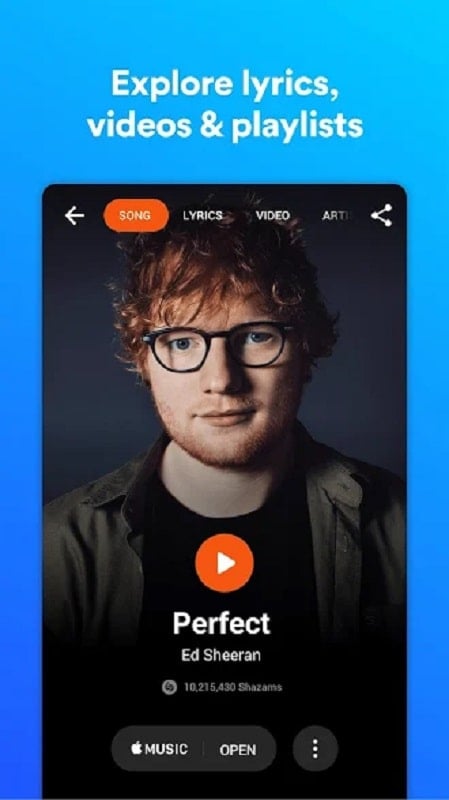
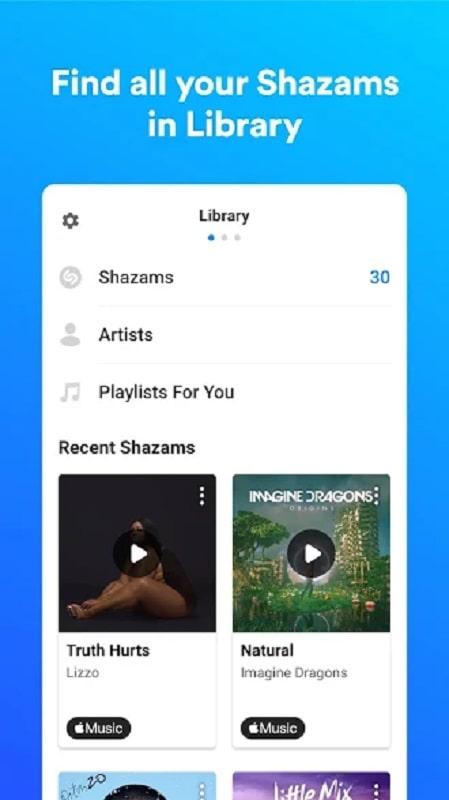
The primary purpose of the app is audio identification: when music is playing nearby you open the app and tap the main button to capture a short sample. Shazam extracts an audio fingerprint from that clip, compares it to a large reference database, and returns a match with the track title, artist name, album artwork and release details. When available, synced lyrics and a direct link to the song on major streaming services are provided so you can jump straight into listening. Matches are kept in a searchable history so you can revisit finds, tag favorites, or export links for playlists.
Shazam is built around one central action for quick recognition, but several controls shape the experience. The main tap starts a listen; contextual buttons appear after a match to show lyrics, open the artist page, or share the result. Persistent on-screen controls let you access history, settings, and account options without leaving the recognition view. For users who prefer minimal interaction, a compact mode keeps the interface uncluttered while still showing essential metadata and playback links.
Instead of levels or progression typical of games, progression in this app is reflected in your personal library and discovery patterns. As you tag more songs they build a searchable history that becomes more valuable over time: you can create collections or export links to build playlists in other services, follow an artist’s catalog, and receive recommendations based on your identified tracks. This soft progression rewards repeated use by making discovery and curation easier, and it supports exporting and sharing so your tagging activity can feed into wider listening habits.
The interface emphasizes clarity with prominent artwork, readable typography, and a restrained color palette that focuses attention on the single recognition action. Metadata is organized into clear sections—track details, lyrics, streaming links and related recommendations—so you can quickly scan results. The history view is structured chronologically with search filters and simple sorting options that help you scan past finds, recover a recent listen, or curate a set of favorites for later playback.
Shazam supports basic customization so you can adapt the app to how you listen. Settings include theme and text-size adjustments to improve readability, toggles for lyric display and autoplay behavior, and options to limit background activity to preserve battery. Accessibility features follow platform conventions: clear labels for screen readers, sufficiently large touch targets for primary actions, and contrast-aware UI elements to help users with visual impairments.
Offline tagging allows you to save audio samples when you lack connectivity; those samples sync and resolve to full metadata once a connection is available. The recognition engine is optimized for fast matches and low power use, with background listening limited unless you explicitly enable continuous recognition. Performance is tuned to work across a wide range of Android devices: recognition speed may vary with ambient noise, microphone quality, and network latency for metadata retrieval, but the core fingerprint comparison is efficient and designed to minimize battery impact.
Microphone permission is required for identification but is used only during active listening sessions unless continuous recognition is enabled by the user. Location and account data are optional and used to personalize recommendations and manage cross-device history only when you choose to sign in. Controls are provided to delete saved tags, disable syncing, and review or revoke permissions at any time so you maintain ownership of your discovery history and personal settings.
Recognizing music in busy spaces is a common challenge. To improve results, move closer to the audio source and reduce competing sounds, try several short listens rather than one long recording, and enable offline tagging if you expect intermittent connectivity. Keep the app up to date to benefit from database expansions and accuracy improvements; enable higher-quality microphone access if your device settings allow it for clearer samples.
Installation and setup are straightforward: grant microphone permission, tap the identify button to start a search, and sign in if you want cross-device history and recommendations. Casual users will find the single-tap recognition immediately valuable while active listeners can build a lasting collection of tagged tracks, export links to playlists, and use recommendations to broaden their listening. Shazam aims to make identifying and saving music around you fast, reliable and easy to manage.

WiFi Speed Test Pro
Size:8.11M ToolsGG Mouse Pro 2
Size:45.82M ToolsResource Monitor Mini Pro
Size:3.19M ToolsSmart Keyboard Pro
Size:23.22M ToolsMyScript Math: Solve & Plot
Size:108.76M ToolsText Repeater
Size:11.73M Tools3Dcalc+
Size:12.59M ToolsMyScoreTracker
Size:80.28M ToolsPanda Touch Pro
Size:18.13M ToolsDual Space : Multi App
Size:7.23M ToolsSound Recorder Plus: Voice Rec
Size:20.50M ToolsVoice Notebook
Size:2.54M ToolsApril 2024 Clash of Clans Update: Unveiling a Fresh Companion, Enhanced Levels, Chat Tagging, and Be
2024-04-16Arrival of Genshin Impact 4.6 Update: 'Embers of Two Realms, Twilight of Crimson'
2024-04-16V2.2 of the Farlight 84 update introduces an overhauled Season structure, fresh in-game currency, an
2024-04-16Monster Never Cry is now accessible on both Android and iOS mobile devices.
2024-04-18PUBG Mobile Teams Up with Bentley Motors: Luxury Cars, Exclusive Collectibles, and Beyond
2024-04-18March 2024 Free Redemption Codes for Honkai: Star Rail
2024-04-18