English
Voice Notebook is a speech-to-text app designed to capture spoken ideas quickly and turn them into editable notes. It offers real-time transcription, pause-and-resume recording, and punctuation commands, making it useful for writers, students, and professionals who need accurate, hands-free note-taking on Android devices.
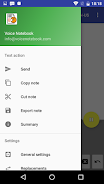
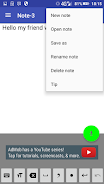
Voice Notebook converts voice into written text with minimal delay, allowing users to dictate memos, lecture notes, meeting summaries, and drafts without toggling between keyboard and voice input. The interface prioritizes clarity: large controls for recording, visible transcription lines, and simple export options streamline the process from speech to shareable text.
The app combines practical transcription tools that support everyday workflows:
Voice Notebook emphasizes an uncluttered user experience. The main screen shows a big record button and a scrolling text area that highlights the most recent transcription. Users can tap anywhere in the text to edit words manually, insert punctuation, or rearrange content. Preset settings let you choose between different languages and dialects so the system adapts to your speaking style.
For professionals, the app can replace manual note-taking during interviews or site visits. Students benefit from recording lectures and generating searchable notes later. Writers may use it for drafting ideas on the go. Establishing a simple routine—open the app, select language, record, and export—keeps the process efficient and repeatable.
Voice Notebook provides options to refine accuracy and behavior. You can adjust recognition language, toggle continuous listening, and configure punctuation verbosity. Some settings let you optimize for noisy environments or slow-talk speakers. Custom hotkeys and quick-access widgets help launch a new recording without navigating multiple menus.
The app is designed to run smoothly on a wide range of Android devices. Transcription speed depends on device processing power and whether cloud-based recognition is used. On modern phones, results appear almost instantly. The app manages memory by streaming text to storage rather than buffering long audio files, helping maintain responsiveness during lengthy sessions.
Privacy is an important consideration for voice apps. Voice Notebook offers local save options so you can keep transcripts on the device rather than uploading everything to third-party servers. When cloud services are enabled for improved recognition, settings explain what data is sent and provide controls to clear history and manage permissions.
Once a transcription is complete, Voice Notebook supports multiple export formats. Send plain text to messaging apps, attach transcripts to emails, or upload files to cloud drives. The app preserves simple formatting like line breaks and paragraph markers so exported notes remain readable across platforms.
To improve accuracy, speak clearly and avoid overlapping conversations. Use an external microphone in noisy spaces and enable the noise-reduction option if available. Break long dictations into shorter segments when possible to make editing faster later. Reviewing and correcting the text immediately after recording reduces the chance of misunderstood words becoming permanent.
Begin by installing the app, granting microphone permission, and selecting your preferred language. Try a short test recording to check microphone placement and recognition settings. From there, create folders or labels to organize transcripts and experiment with export options to integrate the app into your existing productivity tools.
Voice Notebook provides a practical solution for anyone who needs fast, reliable voice-to-text conversion on Android. Its combination of live transcription, user-friendly controls, and export flexibility makes it a dependable choice for capturing spoken content and turning it into usable, editable text.

Smart Keyboard Pro
Size:23.22M ToolsMyScript Math: Solve & Plot
Size:108.76M ToolsText Repeater
Size:11.73M Tools3Dcalc+
Size:12.59M ToolsMyScoreTracker
Size:80.28M ToolsPanda Touch Pro
Size:18.13M ToolsDual Space : Multi App
Size:7.23M ToolsSound Recorder Plus: Voice Rec
Size:20.50M ToolsVoice Notebook
Size:2.54M ToolsVPN Australia
Size:18.00M ToolsMulti Parallel
Size:7.00M ToolsRemote for Smart Samsung TV
Size:53.60M ToolsApril 2024 Clash of Clans Update: Unveiling a Fresh Companion, Enhanced Levels, Chat Tagging, and Be
2024-04-16Arrival of Genshin Impact 4.6 Update: 'Embers of Two Realms, Twilight of Crimson'
2024-04-16V2.2 of the Farlight 84 update introduces an overhauled Season structure, fresh in-game currency, an
2024-04-16Monster Never Cry is now accessible on both Android and iOS mobile devices.
2024-04-18PUBG Mobile Teams Up with Bentley Motors: Luxury Cars, Exclusive Collectibles, and Beyond
2024-04-18March 2024 Free Redemption Codes for Honkai: Star Rail
2024-04-18