English
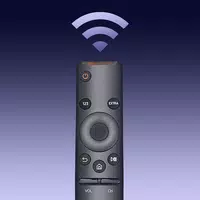
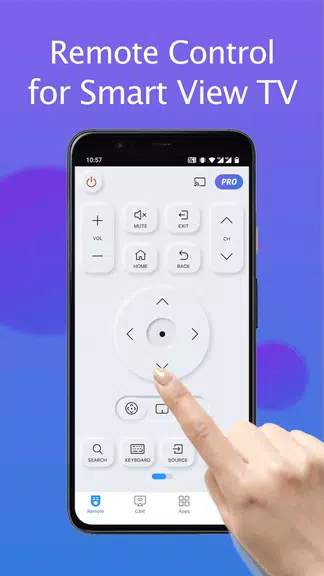
Remote for Smart Samsung TV is a handy Android utility that turns your phone into a full-featured TV remote. It connects over local Wi-Fi to control channels, volume, apps, and inputs. The interface is intuitive and designed to replicate a physical remote without extra hardware.
The Remote for Smart Samsung TV app provides fast access to core television controls and smart features. It pairs with compatible Samsung models and exposes navigation buttons, a D-pad, media playback controls, and app shortcuts. Setup typically requires both devices to be on the same network and a one-time permission exchange for remote control.
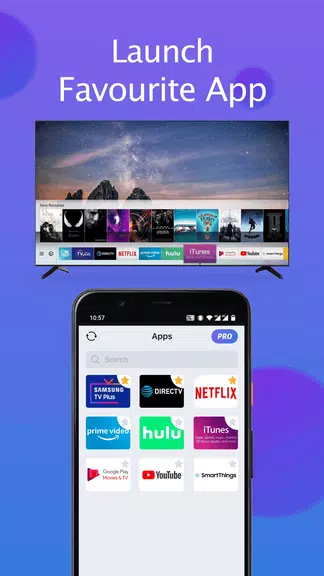
This app focuses on practical functions that reduce friction during daily use. You get tactile on-screen buttons, a numeric keypad for direct channel entry, and quick access to popular streaming services. The app also supports input switching, mute and unmute, and sleep timers. All controls are laid out to minimize the number of taps needed to accomplish common tasks.
After installation, open Remote for Smart Samsung TV and let it scan the network for compatible TVs. Tap the target device to initiate pairing and accept the prompt on your TV when required. Once connected, the interface becomes active and responsive. Commands are transmitted over the local network, which reduces latency compared to some cloud-based solutions.
The app's layout balances familiarity and clarity. Large buttons and a centered D-pad make navigation comfortable from a distance. Visual feedback confirms each press, and a compact layout keeps secondary options tucked away until needed. For users who prefer simplicity, a minimalist theme is available to disable advanced controls.
Performance depends mainly on local Wi‑Fi strength. On a stable 5 GHz network the app is snappy; on congested or distant networks you may notice slight delays. Remote for Smart Samsung TV is designed to be lightweight, so it runs smoothly on most Android devices without significant battery drain.
The app offers modest customization to fit different workflows. You can rearrange commonly used buttons, switch color themes, and set the app to launch a preferred streaming service on connect. For households with multiple TVs, saved device profiles make switching between living room and bedroom sets straightforward.
Remote for Smart Samsung TV also supports family-friendly conveniences like a mute-by-tap and a sleep timer for late-night viewing. The app avoids clutter and focuses on the controls people actually use most often. Regular updates add device compatibility and polish to the UX.
People choose this app when their original remote is lost, broken, or when they prefer an on-hand digital control with faster access to apps. It’s also useful for households where a single device needs to control multiple Samsung TVs. The convenience of using your phone as a remote and the elimination of extra accessories are common reasons for adoption.
Download and open Remote for Smart Samsung TV, follow the on-screen prompts to scan for your TV, accept pairing requests, and customize the layout if desired. Basic operation is immediate, so most users are fully functional within a minute of setup.
For anyone seeking a straightforward, reliable alternative to a physical controller, this app strikes a practical balance between functionality and ease of use while keeping the focus on core TV interactions.
Smart Keyboard Pro
Size:23.22M ToolsMyScript Math: Solve & Plot
Size:108.76M ToolsText Repeater
Size:11.73M Tools3Dcalc+
Size:12.59M ToolsMyScoreTracker
Size:80.28M ToolsPanda Touch Pro
Size:18.13M ToolsDual Space : Multi App
Size:7.23M ToolsSound Recorder Plus: Voice Rec
Size:20.50M ToolsVoice Notebook
Size:2.54M ToolsVPN Australia
Size:18.00M ToolsMulti Parallel
Size:7.00M ToolsRemote for Smart Samsung TV
Size:53.60M ToolsApril 2024 Clash of Clans Update: Unveiling a Fresh Companion, Enhanced Levels, Chat Tagging, and Be
2024-04-16Arrival of Genshin Impact 4.6 Update: 'Embers of Two Realms, Twilight of Crimson'
2024-04-16V2.2 of the Farlight 84 update introduces an overhauled Season structure, fresh in-game currency, an
2024-04-16Monster Never Cry is now accessible on both Android and iOS mobile devices.
2024-04-18PUBG Mobile Teams Up with Bentley Motors: Luxury Cars, Exclusive Collectibles, and Beyond
2024-04-18March 2024 Free Redemption Codes for Honkai: Star Rail
2024-04-18