English
Cool text and symbols is a lightweight Android utility that lets you craft stylish messages using fonts, symbols, and special characters. With a concise toolset for decorating text, the app helps users personalize social posts, bios, and messages without complex steps or extra installations.
Cool text and symbols focuses on simplifying text decoration. Instead of navigating multiple menus, it offers a central editor where you pick a font style, insert symbols, and preview output in real time. The result can be copied, shared, or sent directly to other apps on your device.
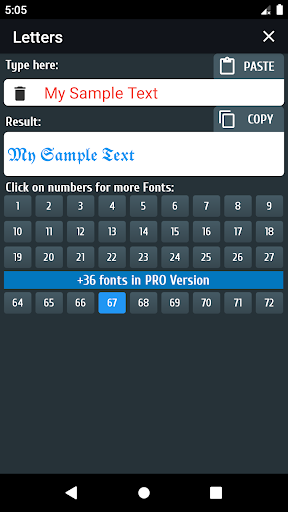
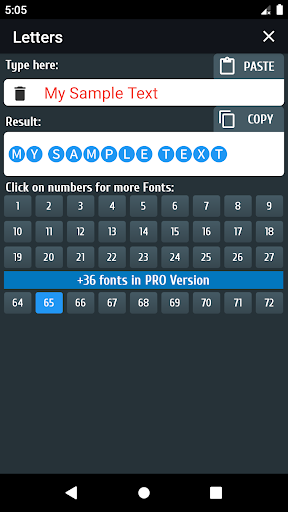
Start by typing or pasting the text you want to modify. Cool text and symbols processes your input and offers multiple stylized outputs at once. Tap any preview to copy it. Filters and sorting make it easy to find the look you want—whether a minimalist variant or a highly decorated option.
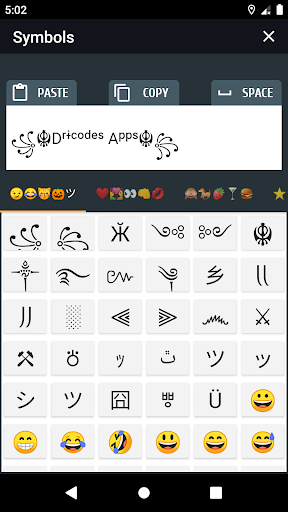
The editor is optimized for short-form uses: profile names, captions, and status updates. Use the search within the symbol library to find glyphs quickly. Save frequently used combinations to the built-in favorites so you can reuse them across different apps without repeating steps.
Personalization sits at the heart of Cool text and symbols. The app includes preset collections for common themes (cute, elegant, hacker-style), and lets you tweak spacing, add separators, or mix multiple fonts in a single line. This flexibility makes it suitable for both casual users and content creators.
Favorites are organized in a simple list. You can rename saved items, reorder them, or delete entries you no longer need. This helps keep the workspace clean and keeps frequently used designs accessible during busy social sessions.
The app uses a straightforward, low-friction interface. Menus are labeled clearly, buttons are large enough for quick taps, and previews render instantly. Because it relies mainly on Unicode transformations, memory and battery usage are minimal, which preserves device responsiveness even on mid-range phones.
Most modern social apps and platforms support the Unicode styles Cool text and symbols produces. However, variation in rendering can occur depending on the platform and font installed on the recipient device. It’s wise to preview how a stylized name or bio appears in the target app before making permanent changes.
Content creators will find Cool text and symbols useful for branding thumbnails, headlines, and social buttons. Casual users can quickly spruce up messages for events, group chats, or profiles. It’s also handy for creating separators, lists, and attention-grabbing lines within posts.
The tool processes text locally without requiring account creation. Permissions are minimal—mostly clipboard and general storage access for sharing—so there’s less exposure of personal data compared with cloud-based alternatives.
Installation is fast and straightforward. After launching, explore the presets to get a feel for available styles. Try converting a short phrase, copy a result, and paste it into your preferred messaging app. With a few quick experiments you’ll discover combinations that match your voice.
Users appreciate Cool text and symbols for its speed, clarity, and practical set of features. It removes friction from the creative process and lets people express personality without needing design skills. Whether you’re updating a profile or crafting a playful note, the app makes small text upgrades immediate and accessible.
WiFi Speed Test Pro
Size:8.11M ToolsGG Mouse Pro 2
Size:45.82M ToolsResource Monitor Mini Pro
Size:3.19M ToolsSmart Keyboard Pro
Size:23.22M ToolsMyScript Math: Solve & Plot
Size:108.76M ToolsText Repeater
Size:11.73M Tools3Dcalc+
Size:12.59M ToolsMyScoreTracker
Size:80.28M ToolsPanda Touch Pro
Size:18.13M ToolsDual Space : Multi App
Size:7.23M ToolsSound Recorder Plus: Voice Rec
Size:20.50M ToolsVoice Notebook
Size:2.54M ToolsApril 2024 Clash of Clans Update: Unveiling a Fresh Companion, Enhanced Levels, Chat Tagging, and Be
2024-04-16Arrival of Genshin Impact 4.6 Update: 'Embers of Two Realms, Twilight of Crimson'
2024-04-16V2.2 of the Farlight 84 update introduces an overhauled Season structure, fresh in-game currency, an
2024-04-16Monster Never Cry is now accessible on both Android and iOS mobile devices.
2024-04-18PUBG Mobile Teams Up with Bentley Motors: Luxury Cars, Exclusive Collectibles, and Beyond
2024-04-18March 2024 Free Redemption Codes for Honkai: Star Rail
2024-04-18