English
Annotium is a lightweight annotation and document-markup tool designed to help professionals and students highlight, tag, and collaborate on PDFs and images. With a focused feature set, Annotium streamlines reviewing, versioning, and sharing notes across devices while keeping export and privacy controls simple and accessible.
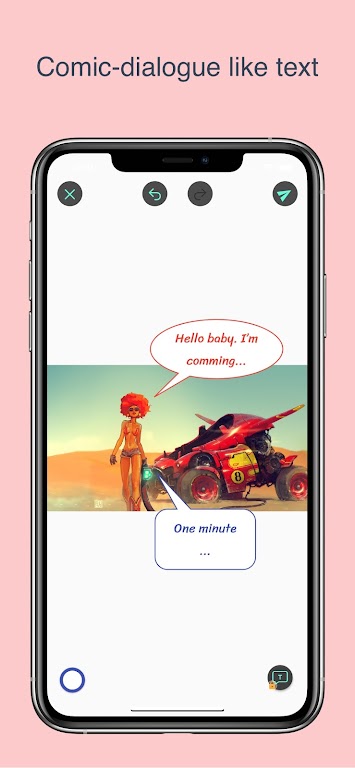
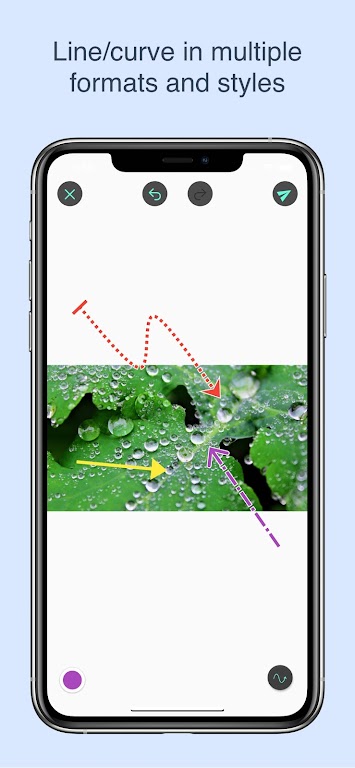
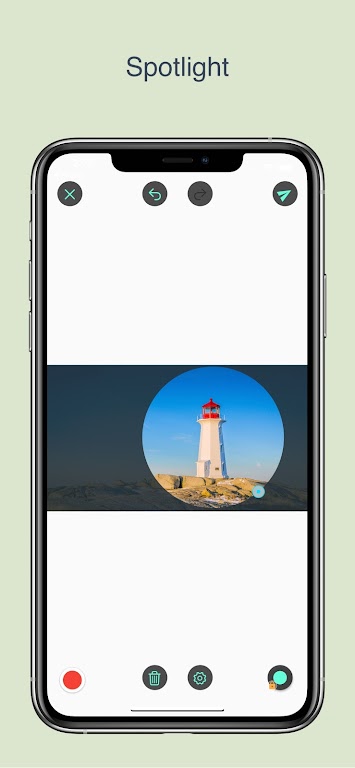
At its core, Annotium is built for fast, precise markups. It combines intuitive drawing and text tools with clip, comment, and tagging features that work on a wide range of file types. Users can mark up pages, attach contextual comments, and organize observations into searchable collections without leaving the app.
Annotium integrates naturally into document review cycles. Open a PDF or image, add highlights and comments, then share a review link or export a marked copy. The app preserves author metadata so reviewers can see who added each note. Version control keeps a history of edits, which helps teams track progress and revert changes when necessary.
The interface emphasizes clarity: a compact toolbar, clear icons, and a distraction-free reading pane. Tools respond quickly even on mid-range devices, and rendering remains smooth with large documents. Performance features include lazy loading of pages and a low-memory mode that maintains responsiveness on lengthy files.
Collaboration is a strong point. Annotium supports shared sessions where multiple contributors can annotate the same document concurrently. Comment threads let collaborators discuss specific marks, and role-based permissions let project leads control who can edit or only view. Exported annotated files contain embedded comments so recipients can follow the conversation offline.
Users can tailor the workspace to their needs. Create custom pen presets, define tag sets for recurring projects, and save export presets for standardized reporting. Annotium connects with cloud storage providers for automatic syncing and can integrate with communication platforms to send review alerts or attach annotated files to tasks.
Privacy and safe file handling are built in. Documents can be stored locally or encrypted when synced to cloud services. Annotium offers a permissions model for shared links and supports password-protected exports. Audit logs record sharing history so administrators can track who accessed or changed a file.
Annotium fits many use cases: editors and designers who need pixel-precise notes, educators reviewing student submissions, engineers marking up diagrams, and small teams coordinating document reviews. Its balance of lightweight performance and robust collaboration tools makes it suitable for both individual productivity and group projects.
Getting started is straightforward: download the app, import a sample document, and try adding a few highlights and comments. As you adopt it across projects, Annotium’s search, tagging, and sharing features reveal their value by cutting review time and keeping feedback organized. For teams that rely on clear, retraceable annotations, the app becomes a practical extension of the review process rather than another tool to manage.
Drawing Studio
Size:100.10M ToolsAnnotium
Size:13.50M ToolsAirConsole Hero
Size:8.70M ToolsWakey - The Cutest Alarm Clock
Size:39.40M ToolsPhonk Music - Song Remix Radio
Size:17.58M ToolsVPN Japan
Size:21.00M ToolsSimple Keyboard
Size:18.00M ToolsBatteryOne
Size:10.36M ToolsEdge Gestures
Size:5.36M ToolsFV File Explorer Pro
Size:165.40M ToolsEpic Games
Size:11.00M ToolsMixing Station
Size:27.31M ToolsApril 2024 Clash of Clans Update: Unveiling a Fresh Companion, Enhanced Levels, Chat Tagging, and Be
2024-04-16Arrival of Genshin Impact 4.6 Update: 'Embers of Two Realms, Twilight of Crimson'
2024-04-16V2.2 of the Farlight 84 update introduces an overhauled Season structure, fresh in-game currency, an
2024-04-16Monster Never Cry is now accessible on both Android and iOS mobile devices.
2024-04-18PUBG Mobile Teams Up with Bentley Motors: Luxury Cars, Exclusive Collectibles, and Beyond
2024-04-18March 2024 Free Redemption Codes for Honkai: Star Rail
2024-04-18