English
Looking for an easy way to sketch on the go? Drawing Studio gives you a pocket canvas so you can capture ideas, practice techniques and polish concepts without carrying paper or pens. This app combines a broad brush library and flexible layer handling with a clean interface aimed at casual doodlers and more serious illustrators alike. In the paragraphs below you'll find what stands out, how the main tools behave, and practical ways to use Drawing Studio during a coffee break or while organizing visual notes for a class or meeting.
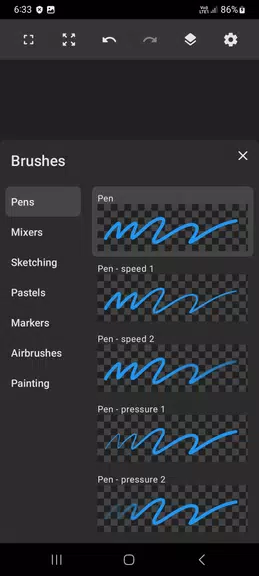
Accessible brush set: A range of brushes from simple pencils to textured paints lets you experiment with line weight and finish.
Layer flexibility: Unlimited layers and easy reorder controls help you separate linework, color and effects for non-destructive editing.
Smooth stroke control: Pressure and smoothing settings allow cleaner shapes and more natural strokes when you use a stylus or your finger.
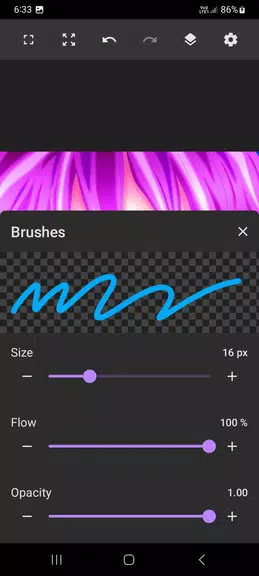
Customizable brushes: Adjust size, opacity and hardness so each brush reacts the way you expect when shading or outlining.
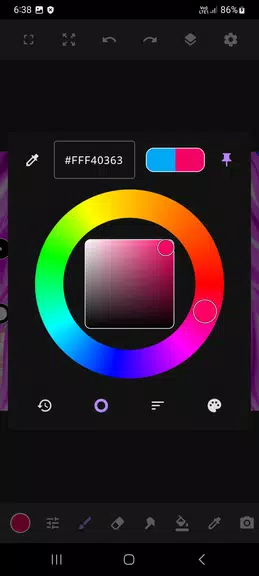
Color tools: Pick colors with a palette, save swatches, and make quick tweaks to hue and saturation while you paint.
Undo and redo history: Work confidently with multiple history steps that let you reverse or compare earlier versions.
Import and export options: Bring photos in as reference layers and export finished images for sharing or printing.
Create a new canvas: Tap new, choose dimensions and background, then pick a brush to begin sketching immediately.
Organize layers: Add layers for separate elements, label or group them, and use opacity sliders to blend adjustments.
Refine and save: Use zoom and smoothing while refining details, then export as an image file to back up or send your work.
Is Drawing Studio suitable for beginners?
Yes. The interface is designed to be approachable, with basic tools easy to find while advanced options remain available as you grow.
Can I work with multiple layers?
Absolutely. Layer controls let you add, hide, merge and adjust opacity so you can build complex compositions without altering earlier steps.
Does it support pressure-sensitive input?
The app supports pressure and smoothing settings that improve responsiveness when you use compatible styluses or tablets.
Compared with carrying a physical sketchbook and a handful of pens, Drawing Studio keeps brushes, colors and layers organized on your device, making it easier to edit and share ideas. The app suits hobbyists who want a simple digital notebook and creators who appreciate finer brush and layer controls, though artists seeking desktop-level tooling may still prefer a full studio application. If you want to sketch, iterate and export without extra supplies, Drawing Studio is a practical companion for both learning and quick production.

Drawing Studio
Size:100.10M ToolsAnnotium
Size:13.50M ToolsAirConsole Hero
Size:8.70M ToolsWakey - The Cutest Alarm Clock
Size:39.40M ToolsPhonk Music - Song Remix Radio
Size:17.58M ToolsVPN Japan
Size:21.00M ToolsSimple Keyboard
Size:18.00M ToolsBatteryOne
Size:10.36M ToolsEdge Gestures
Size:5.36M ToolsFV File Explorer Pro
Size:165.40M ToolsEpic Games
Size:11.00M ToolsMixing Station
Size:27.31M ToolsApril 2024 Clash of Clans Update: Unveiling a Fresh Companion, Enhanced Levels, Chat Tagging, and Be
2024-04-16Arrival of Genshin Impact 4.6 Update: 'Embers of Two Realms, Twilight of Crimson'
2024-04-16V2.2 of the Farlight 84 update introduces an overhauled Season structure, fresh in-game currency, an
2024-04-16Monster Never Cry is now accessible on both Android and iOS mobile devices.
2024-04-18PUBG Mobile Teams Up with Bentley Motors: Luxury Cars, Exclusive Collectibles, and Beyond
2024-04-18March 2024 Free Redemption Codes for Honkai: Star Rail
2024-04-18