English
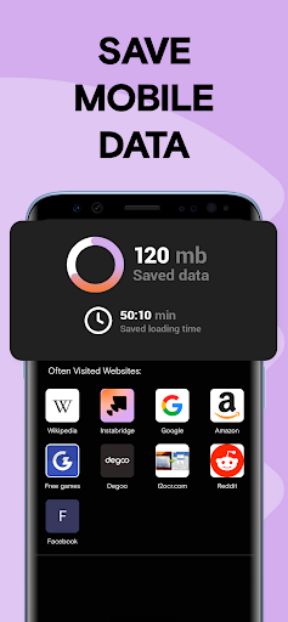
WiFi Passwords: Instabridge helps you discover and connect to shared Wi-Fi networks with a single tap. The app aggregates community-shared routers, stores passwords for offline access, and simplifies public hotspot use. Designed for travelers and commuters, it balances convenience with clear privacy indicators and straightforward connection tools.
WiFi Passwords: Instabridge offers a clean set of tools designed to speed up finding reliable internet. It includes a searchable database of hotspots, an offline mode for saved networks, one-tap connections, and a basic speed and stability indicator. The app focuses on convenience without cluttering the experience with unnecessary options.
The app relies on a community-driven model where users share router names and connection details for publicly accessible networks. When you open the map or list view, nearby shared hotspots appear along with distance and connection status. Selecting a network displays saved credentials when available and triggers an automatic connection process so you don’t need to type passwords manually.
Interface design emphasizes clarity: large map markers, an easy-to-read list view, and simple icons for connection strength and safety. New users can quickly switch between map and list modes, add networks to a personal collection, or save favorites for future offline use. Menus are compact, with essential actions like connect, save, and report accessible in one tap.
Instabridge presents clear privacy cues and basic hygiene recommendations. Shared passwords are intended for open or publicly permitted networks — the app does not attempt to bypass private protections. It shows whether a network is marked as trusted, suggests when to use VPNs on unsecured connections, and provides options to remove your own shared entries at any time.
Designed for Android devices, WiFi Passwords: Instabridge is lightweight and optimized to conserve battery while scanning for nearby hotspots. Background scanning frequency is adjustable to limit power usage. The app supports a wide range of Android versions and device manufacturers, with regular updates to maintain compatibility and responsiveness across different hardware.
For frequent travelers, students, and remote workers, the app reduces time spent asking for guest passwords or hunting down cafes. You can preload saved networks before heading into an area with spotty connectivity, and use the app’s indicators to choose the strongest available link. It’s a useful companion when you need Internet access quickly and don’t want to interrupt a workflow.
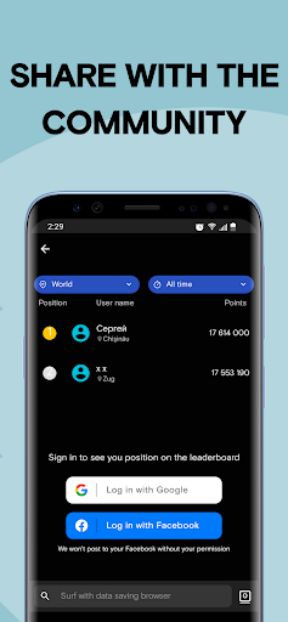
Users can create an account to sync saved networks across devices, contribute new entries, and curate a personal list of trusted hotspots. Settings allow control over notifications, offline storage limits, and the degree of background activity. These options help tailor performance to your preferences while keeping the experience straightforward.
Download WiFi Passwords: Instabridge from a trusted app store, create or sign in to an account if you want sync features, and grant location permissions so the app can display nearby hotspots. Begin by exploring the map, saving a few networks you trust, and testing one-tap connections. The initial setup takes only a few minutes and makes subsequent connections nearly automatic.
Whether you need occasional access on the go or a reliable way to find public Wi-Fi quickly, WiFi Passwords: Instabridge streamlines the process while offering practical controls for privacy and performance.


OfficeMail Pro
Size:69.00M ProductivityPrint From Anywhere
Size:54.00M ProductivityWiFi Passwords: Instabridge
Size:63.45M ProductivityPerfect Ear: Music & Rhythm
Size:10.34M ProductivityInSaver
Size:13.42M ProductivityDesh Hindi Keyboard
Size:21.40M ProductivityOffice Reader
Size:33.40M ProductivityMazii: Dict. to learn Japanese
Size:100.58M ProductivityFlyer Maker
Size:36.60M ProductivityEWA: Learn English & Spanish
Size:131.30M ProductivityLazyBoard - Phrase Keyboard
Size:4.70M ProductivityDrops: Language Learning
Size:258.30M ProductivityApril 2024 Clash of Clans Update: Unveiling a Fresh Companion, Enhanced Levels, Chat Tagging, and Be
2024-04-16Arrival of Genshin Impact 4.6 Update: 'Embers of Two Realms, Twilight of Crimson'
2024-04-16V2.2 of the Farlight 84 update introduces an overhauled Season structure, fresh in-game currency, an
2024-04-16Monster Never Cry is now accessible on both Android and iOS mobile devices.
2024-04-18PUBG Mobile Teams Up with Bentley Motors: Luxury Cars, Exclusive Collectibles, and Beyond
2024-04-18March 2024 Free Redemption Codes for Honkai: Star Rail
2024-04-18