English
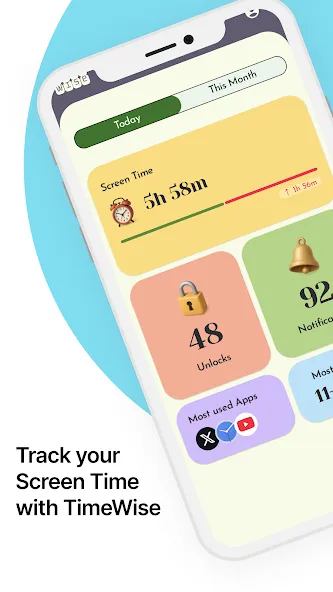
Mobile productivity and digital wellbeing tools have a new daily companion with TimeWise. This Android app blends simple time-tracking with a clear calendar view and customizable displays so you can see where your minutes go, spot distractions and shape better habits. TimeWise presents activity breakdowns, unlock counts and notification summaries in a layout that feels light and approachable, while options for themes and layouts let you tailor the look to your routine. Whether you want quick insights or deeper weekly trends, TimeWise works as a personal accountability hub that fits into many workflows.
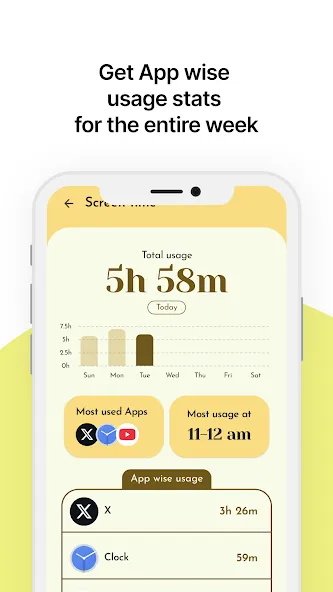
Screen time breakdown: A concise summary shows how long you spend in each app and which categories dominate your day.
Top app ranking: The five apps you use most are highlighted so you can spot where attention concentrates.
Unlock meter: Counts how often you wake the device to help reveal compulsive checking habits.
Notification tally: Tracks incoming alerts so you can identify the apps that interrupt focus most often.
Calendar and task view: A single view ties events and tasks together, making it easier to plan your day without switching apps.
Dashboard overview: A compact home screen that surfaces today’s totals and the biggest time sinks at a glance.
Daily and weekly reports: Periodic summaries designed to show trends, spikes and progress over time.
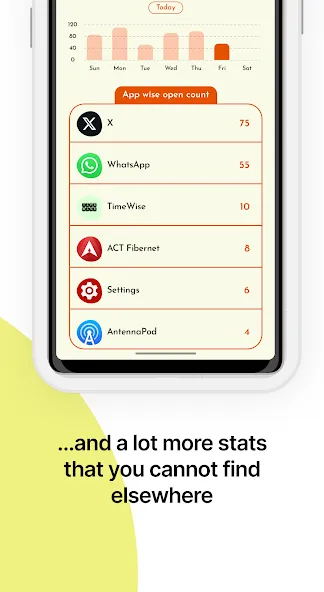
App usage lists: Ranked lists that compare how much attention each app receives, with optional inclusion of system time.
Offline mode: Core features remain available when you’re offline, so schedules and recent stats stay accessible even without a connection.
Set a weekly review habit: Open TimeWise at the end of the week to compare days, notice patterns and plan small adjustments for the next week.
Use it during focused sessions: Start a study or work block and check the unlock counter afterwards to see if device checking broke your concentration.
Adjust notifications: Use the notification tally as a guide to silence or restrict apps that generate frequent interruptions.
Is TimeWise free to use?
The app offers a free tier with essential tracking tools; advanced analytics and additional features are available through a subscription option.
Will TimeWise drain my battery?
TimeWise is built to monitor activity without heavy power use and runs quietly in the background, though any tracking app will add some overhead depending on device and settings.
Can TimeWise sync with my calendar?
Yes, the app supports calendar integration so you can view events alongside usage stats for better planning and context.
If you want a straightforward way to measure screen habits and reduce distractions, TimeWise is a practical pick for Android users who prefer clear visuals and simple controls; it’s especially useful for people aiming to build better routines while premium analytics remain an optional upgrade.
My TVK
Size:22.64M ProductivitySaral
Size:71.61M ProductivityP6SLite
Size:128.64M ProductivityTimeWise
Size:52.28M ProductivityAuroScholar
Size:143.17M ProductivityPTE Exam Practice
Size:16.53M ProductivityAPEUni
Size:16.53M ProductivityAsura Scans
Size:78.10M ProductivityPW - India's Learning Platform
Size:115.70M ProductivitySaphalam
Size:4.80M ProductivityScratchJr
Size:19.10M ProductivityOfferUp
Size:84.00M ProductivityApril 2024 Clash of Clans Update: Unveiling a Fresh Companion, Enhanced Levels, Chat Tagging, and Be
2024-04-16Arrival of Genshin Impact 4.6 Update: 'Embers of Two Realms, Twilight of Crimson'
2024-04-16V2.2 of the Farlight 84 update introduces an overhauled Season structure, fresh in-game currency, an
2024-04-16Monster Never Cry is now accessible on both Android and iOS mobile devices.
2024-04-18PUBG Mobile Teams Up with Bentley Motors: Luxury Cars, Exclusive Collectibles, and Beyond
2024-04-18March 2024 Free Redemption Codes for Honkai: Star Rail
2024-04-18