English
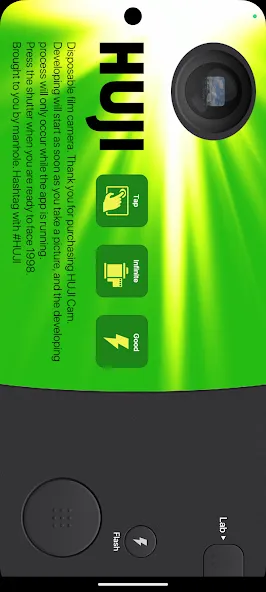
Huji Cam recreates the look of disposable film cameras with an ultra-simple interface and dated color casting, giving digital photos a nostalgic, film-like finish. The app offers one-tap shooting, light leaks, and time-stamped overlays that mimic classic analog photography while keeping editing effortless for everyday use.
Huji Cam transforms ordinary smartphone photos into images reminiscent of 1990s film prints. It simulates grain, vignetting, color shifts, and unpredictable light flares so pictures feel analog without complex post-processing. The focus is on mood and atmosphere rather than technical perfection, making it easy to create distinctive visuals for social feeds and personal archives.
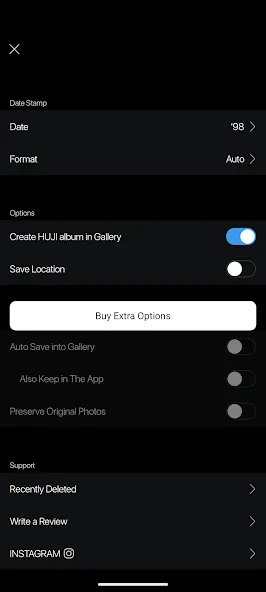
The app keeps controls minimal while delivering strong stylistic results. Key elements include an authentic film grain engine, randomized light leaks, and a built-in timestamp option. Users can enable or disable flashes, switch between front and rear cameras, and use a fixed exposure filter that preserves the vintage effect across different lighting conditions.
Huji Cam’s interface emphasizes immediacy: a clean viewfinder with a few toggles keeps the camera front and center. There are no complex layers of menus to learn. Tap to shoot, review, and save. The simplicity speeds up the creative process and prevents over-editing, encouraging users to embrace the imperfections that make each shot unique.
The app combines several image-processing steps to generate its trademark aesthetic. First, a color transform shifts hues toward warmer tones and increases contrast. Next, a grain layer and subtle vignetting add texture and depth. Finally, randomized light artifacts and optional timestamps are composited to produce the final image. Because many effects are procedurally generated, repeated shots maintain variety even with the same settings.
To maximize the vintage effect, consider these practical guidelines:
Huji Cam is designed to run smoothly on a wide range of Android devices. Image processing is optimized for real-time preview on modern phones, while older devices may experience slightly longer save times depending on hardware. The app stores photos in standard formats so they integrate easily with galleries, cloud backups, and social media platforms.
Permissions are limited to camera and storage access required for capturing and saving photographs. Photos remain on the device unless the user chooses to share or upload them. The straightforward permission model minimizes background activity and helps maintain user control over personal images.
Enthusiasts and casual users alike pick Huji Cam for its ability to produce instantly recognizable, nostalgic imagery without a steep learning curve. It’s particularly popular for lifestyle photography, travel snapshots, and social content where a specific mood is more important than technical sharpness. The unpredictable light artifacts become creative tools rather than flaws.
Download and open the app, grant camera and storage access, then frame your first shot. Toggle the timestamp or flash if desired, and press the shutter. Review the saved photo in your gallery and experiment with different lighting and angles to discover which settings best match your aesthetic. Over time, you'll develop an intuitive sense for how the app interprets different scenes.
With its minimal controls and distinct vintage output, Huji Cam offers a quick way to give modern photos an analog soul. The app’s combination of automated effects and spontaneous results makes it a useful addition to any mobile photographer’s toolkit.



GCamera
Size:15.90M PhotographyHuji Cam
Size:30.81M PhotographyCanon Camera Connect
Size:28.78M PhotographyFuno AI
Size:27.85M PhotographyAarya Editz
Size:9.19M PhotographyStory Editor
Size:59.51M PhotographyTimestamp Camera EnterprisePro
Size:6.59M PhotographyAniDub Max
Size:74.39M PhotographySnap Pro
Size:23.16M PhotographyFilmic Legacy
Size:38.19M PhotographyPhotoLayers-Superimpose,Eraser
Size:242.49M PhotographyMV Master
Size:47.29M PhotographyApril 2024 Clash of Clans Update: Unveiling a Fresh Companion, Enhanced Levels, Chat Tagging, and Be
2024-04-16Arrival of Genshin Impact 4.6 Update: 'Embers of Two Realms, Twilight of Crimson'
2024-04-16V2.2 of the Farlight 84 update introduces an overhauled Season structure, fresh in-game currency, an
2024-04-16Monster Never Cry is now accessible on both Android and iOS mobile devices.
2024-04-18PUBG Mobile Teams Up with Bentley Motors: Luxury Cars, Exclusive Collectibles, and Beyond
2024-04-18March 2024 Free Redemption Codes for Honkai: Star Rail
2024-04-18