English
Inkpad Notepad & To do list offers a clean, fast note-taking and task management experience that combines plain-text notes, checklists, and reminders in a compact app. Designed for daily productivity, it supports offline editing, widgets, and categories so you can capture ideas, plan tasks, and track progress without clutter.
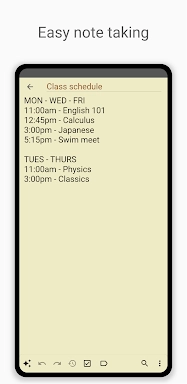
Inkpad Notepad & To do list unites simple note creation with lightweight to-do lists so users can manage both ideas and actions in one place. Notes can be edited quickly, formatted with basic options, and converted into checklists. The app is geared toward people who want speed and clarity rather than heavy feature bloat.
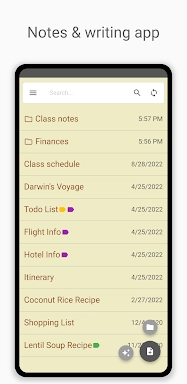
The layout emphasizes readability: high-contrast text, uncluttered toolbars, and a logical flow from list view to edit mode. Controls are large enough for easy tapping, while long-press and swipe gestures speed up routine tasks like checking off items or deleting notes. For users who value minimalism, the app’s interface allows fast capture without interrupting other tasks.
Inkpad Notepad & To do list encourages habit-based planning by blending short notes and task lists. Use it to gather meeting highlights, jot quick ideas, or build daily checklists. The ability to pin important reminders and create recurring tasks makes it simple to maintain routines. Color-coded tags and priorities help you scan what needs attention at a glance.
Reliable data handling is essential for any productivity app. This app offers optional cloud synchronization to keep notes consistent across devices while allowing local-only storage for privacy-conscious users. Automatic backups reduce the risk of data loss, and export options make it easy to save notes in common formats for sharing or archiving.
Designed to be lightweight, the app launches quickly and runs smoothly on a wide range of Android devices. It consumes minimal battery and memory compared with more feature-heavy alternatives, making it a good choice for older phones or devices with limited resources. Regular updates address compatibility and security improvements.
Personalize the experience with themes, font sizing, and widget layouts. Users can choose a compact list view for dense information or a spacious layout for journaling and longer notes. Notification tones and reminder intervals are adjustable, allowing tailored alerts that fit individual routines.
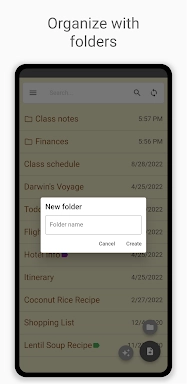
Begin by creating a folder structure that mirrors your life: work, personal, shopping, and projects. Add a widget for your top priorities and enable reminders for any deadlines. If you prefer offline control, skip cloud sync and rely on manual exports. Small setup steps can make daily use much smoother.
Many people pick Inkpad Notepad & To do list because it strikes a balance between simple note-taking and practical task management. It removes distractions while offering just enough structure to keep lists organized and actionable. For anyone seeking a straightforward digital notepad with quality-of-life features, it delivers a dependable solution.
Inkpad Notepad & To do list
Size:4.30M LifestyleKetoBL
Size:0.70M LifestyleHeadunit Reloaded
Size:40.90M LifestyleWatchMaker Watch Faces
Size:69.20M LifestyleEarth 3D Map
Size:86.90M LifestylePlugShare
Size:29.40M LifestyleWeather Live Wallpapers
Size:44.30M LifestyleZalando
Size:268.83M LifestyleTalkIt!
Size:4.87M LifestyleResilio Sync
Size:24.60M LifestyleMy V3 Ads
Size:21.02M LifestyleAccuWeather
Size:112.80M LifestyleApril 2024 Clash of Clans Update: Unveiling a Fresh Companion, Enhanced Levels, Chat Tagging, and Be
2024-04-16Arrival of Genshin Impact 4.6 Update: 'Embers of Two Realms, Twilight of Crimson'
2024-04-16V2.2 of the Farlight 84 update introduces an overhauled Season structure, fresh in-game currency, an
2024-04-16Monster Never Cry is now accessible on both Android and iOS mobile devices.
2024-04-18PUBG Mobile Teams Up with Bentley Motors: Luxury Cars, Exclusive Collectibles, and Beyond
2024-04-18March 2024 Free Redemption Codes for Honkai: Star Rail
2024-04-18