English
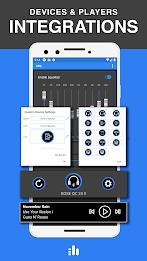
Mobile audio enhancement tools for Android now include Equalizer & Bass Booster - XEQ, a compact app designed to polish your device's sound. Whether you rely on earbuds, Bluetooth speakers, or the car stereo, this app puts multiband control and device-specific presets at your fingertips. XEQ blends a 10-band equalizer with bass and volume boosting, a virtualizer for a wider soundstage, and device-aware preset recall so your listening setup sounds consistent every time you connect.
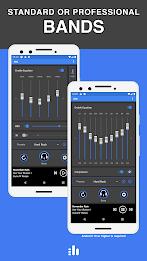
10-Band Equalizer: Fine-tune frequencies across a wide spectrum to sculpt clarity, mids, and treble for different music styles.
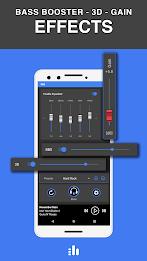
Bass Booster: Add weight to low-end playback for genres that benefit from deeper bass without muddying the rest of the mix.
Volume Amplifier and Sound Booster: Increase perceived loudness beyond the system default while keeping distortion under control where possible.
Virtualizer (3D effect): Create a sense of space and separation, useful when headphones make tracks feel too narrow.
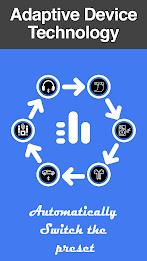
Device Preset Management: Save dedicated presets per output device so your phone automatically loads the right EQ when you plug in headphones or connect to a car.
Spotify Integration: View current track info and control basic playback without switching apps, improving workflow for streaming listeners.
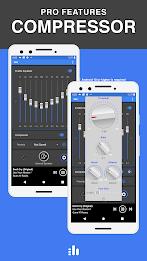
Professional Dynamics Tools: Multiband compression and a limiter are included in the advanced set, giving more control over peaks and balance.
Preset Modes: Ready-made profiles for common listening situations like pop, jazz, or rock make it quick to get a pleasing sound instantly.
Per-Device Presets: Create separate setups for wired earbuds, Bluetooth headphones, and car audio to maintain consistent tone across hardware.
Manual Customization: If you prefer hands-on control, the graphic equalizer and gain controls let you build a signature sound from scratch.
Pro Features: Multiband compressor and limiter are part of the advanced toolkit for users who want tighter dynamics and safer peak control.
Start from a flat curve: Reset the bands before creating a new preset so adjustments are deliberate and you avoid accidental colorations.
Match presets to environments: In noisy places like a gym, prioritize clarity and a mild bass lift; in quiet listening at home, reduce boosted lows for better detail.
Use device presets for convenience: Save a headphone preset and a car preset — the app can auto-recall them when a device connects, sparing you manual switching.
Practical scenario - commuting: During a noisy commute, a focused mid-boost and light compression can help vocals cut through engine noise without cranking volume.
Practical scenario - watching movies on a flight: Apply a wider virtualizer and firmer low-end to make on-device playback feel more cinematic, while keeping volume reasonable to avoid cabin disturbance.
Does this app work with streaming services like Spotify?
Yes. The app reads current track details and offers basic playback controls for Spotify while enhancing the output audio.
Will boosting volume damage my device or headphones?
Excessive amplification can stress hardware. Use the limiter and keep an ear out for distortion; the app includes tools to reduce peaks but sensible levels protect speakers and hearing.
What Android version do I need?
Advanced features require Android 10 or higher and some pro tools may be gated behind a paid upgrade. Basic equalizer functions work on supported devices running the required OS.
Equalizer & Bass Booster - XEQ is a versatile audio tool for Android users who want hands-on control over tone and loudness, with convenient device-aware presets and useful streaming integration. If you enjoy tailoring sound for different headphones or listening situations, this app is worth trying; just be mindful of volume and the limits of your hardware.
Equalizer & Bass Booster - XEQ
Size:5.23M ToolsPhoto Search
Size:27.94M ToolsDrawing Studio
Size:100.10M ToolsAnnotium
Size:13.50M ToolsAirConsole Hero
Size:8.70M ToolsWakey - The Cutest Alarm Clock
Size:39.40M ToolsPhonk Music - Song Remix Radio
Size:17.58M ToolsVPN Japan
Size:21.00M ToolsSimple Keyboard
Size:18.00M ToolsBatteryOne
Size:10.36M ToolsEdge Gestures
Size:5.36M ToolsFV File Explorer Pro
Size:165.40M ToolsApril 2024 Clash of Clans Update: Unveiling a Fresh Companion, Enhanced Levels, Chat Tagging, and Be
2024-04-16Arrival of Genshin Impact 4.6 Update: 'Embers of Two Realms, Twilight of Crimson'
2024-04-16V2.2 of the Farlight 84 update introduces an overhauled Season structure, fresh in-game currency, an
2024-04-16Monster Never Cry is now accessible on both Android and iOS mobile devices.
2024-04-18PUBG Mobile Teams Up with Bentley Motors: Luxury Cars, Exclusive Collectibles, and Beyond
2024-04-18March 2024 Free Redemption Codes for Honkai: Star Rail
2024-04-18