English
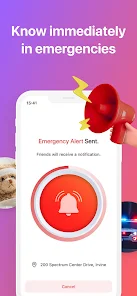
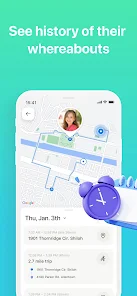
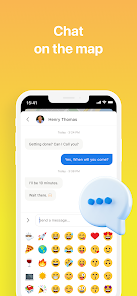
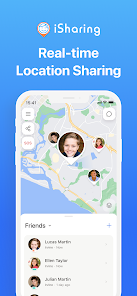
iSharing is a real-time family locator and GPS phone tracker that helps families and caregivers stay connected without constant texting. iSharing provides live location updates, automatic arrival and departure alerts, a panic button for quick emergency notifications, and a Find My Phone feature to help locate misplaced devices. Designed to reduce repetitive checks and give parents and trusted contacts timely situational awareness, the app combines a private map view, searchable 90-day location history, and voice messaging that works like a walkie-talkie for quick exchanges when a call is unnecessary.
The core features of iSharing center on location accuracy and simple notifications. The private map shows current positions of everyone who has agreed to share, with timestamps and distance estimates. Arrival and departure alerts are built on configurable place markers so you can define home, school or work and receive hands-free updates when a family member arrives or leaves. A one-touch panic alert sends your position to selected contacts along with an optional message. Walkie-talkie voice messages are available for short, direct communications without dialing. The Find My Phone tool reports a lost device's approximate location in real time, and the app retains location history for up to 90 days so you can review recent movements when needed.
Using iSharing begins with a straightforward setup where a group organizer invites family or friends by phone number or email and each participant grants location permission. The map interface lets you pan, pinch to zoom, switch between standard and satellite views, and tap a profile to see last update time and battery status. Geofence controls are accessible from the place editor, allowing you to draw or name zones and specify which alerts trigger on arrival and departure. Voice messaging uses a simple press-and-hold control to record and send short clips, and the panic button is available from both the app and a widget for faster access. Most controls are designed for one-handed operation and clear labels to make them usable in everyday situations.
iSharing is intended for voluntary, consent-based location sharing; every participant must approve tracking and can stop sharing at any time. The app stores location history for the period displayed in settings and provides options to clear data or disable history logging. Background location permission may be requested to maintain real-time updates when the app is not in the foreground, and you control whether voice messages and alerts are shared. If you manage a family account you can adjust contact lists, notification recipients, and who receives panic alerts, making the app suitable for families, caregivers, and trusted networks.
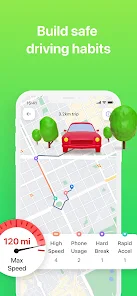
The app offers a range of customization so users can tailor notifications and privacy to their needs. You can rename places, set custom alert tones, filter which contacts trigger push notifications, and toggle map detail levels to conserve data. iSharing also offers a premium subscription with extra capabilities such as extended location history beyond 90 days, driving alerts that detect long trips or sudden stops, low battery notifications for tracked devices, and an ad-free experience. These premium features are optional and unlocked through in-app purchase, while the basic location sharing functions remain available in the free version.
The interface is designed to be accessible with readable fonts, clear contrast, and simple navigation gestures. Visual and haptic feedback confirm actions like recording a voice clip or setting a place, and support documentation is available within the app for common tasks and troubleshooting. Offline or poor-signal conditions are handled by caching the last known position and queuing voice messages until connectivity returns, though real-time updates and precise GPS accuracy require an active connection. Battery optimization settings help balance location frequency and power use so you can choose longer update intervals to conserve charge.
iSharing relies on device GPS, network availability and user consent, so accuracy and timeliness depend on those factors. Some advanced alerts and historical data are behind a paid plan, and continuous background tracking can affect battery life. The app is designed for open communication and agreed-upon sharing; it is not intended for covert tracking. Users should review permissions and account settings when installing and when devices are shared or transferred to ensure privacy and correct operation.

drupe
Size:52.21M CommunicationiSharing
Size:20.50M Communicationimo video calls and chat
Size:102.20M CommunicationWhoscall
Size:46.10M CommunicationGroundwire
Size:61.64M CommunicationOH Private Web Browser
Size:4.59M CommunicationBIG Phone for Seniors
Size:10.01M CommunicationFree Adblocker Browser
Size:188.40M CommunicationSoundCloud
Size:95.60M CommunicationInst Saver Post Story Saver
Size:11.13M CommunicationVani Dialer
Size:35.25M CommunicationSimple SMS Messenger
Size:19.80M CommunicationApril 2024 Clash of Clans Update: Unveiling a Fresh Companion, Enhanced Levels, Chat Tagging, and Be
2024-04-16Arrival of Genshin Impact 4.6 Update: 'Embers of Two Realms, Twilight of Crimson'
2024-04-16V2.2 of the Farlight 84 update introduces an overhauled Season structure, fresh in-game currency, an
2024-04-16Monster Never Cry is now accessible on both Android and iOS mobile devices.
2024-04-18PUBG Mobile Teams Up with Bentley Motors: Luxury Cars, Exclusive Collectibles, and Beyond
2024-04-18March 2024 Free Redemption Codes for Honkai: Star Rail
2024-04-18