English
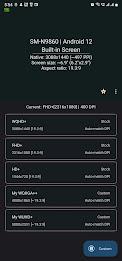
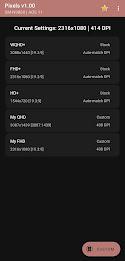
Pixels: Resolution+DPI Changer puts granular control of your Android display into your hands, letting you test and apply custom screen resolutions and DPI (density) settings without permanent changes. Ideal for developers, power users, or anyone who wants sharper text, larger interface elements, or to optimize apps for different sizes, the tool uses a one-time WRITE_SECURE_SETTINGS grant via ADB (not root) to adjust system values; rooted devices (v1.10+) can grant permissions directly. The app reads factory defaults, offers a straightforward reset option, and includes smart helpers to compute matching dimensions and density values when enabled.
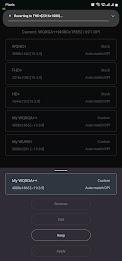
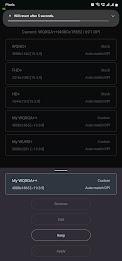
⭐ Pixels: Resolution+DPI Changer lets you test and apply custom resolutions and DPI quickly and revert when needed.
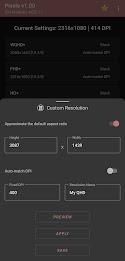
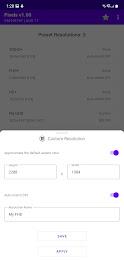
⭐ Option to compute the opposite display dimension (height or width) from one input using the device's aspect ratio.
⭐ Optional trigonometric calculations produce suggested matching density (DPI) for a chosen resolution.
⭐ Automatically reads your device's predefined screen resolution settings so you can switch back easily.
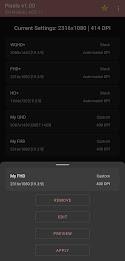
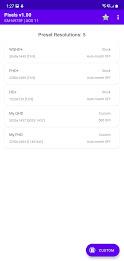
⭐ Save custom presets for quick recall; the premium version allows multiple saved configurations while free users are limited to one.
⭐ Modern material visuals with a dynamic icon on Android 12 and later for a cohesive look.
✅ Pixels: Resolution+DPI Changer gives fine-grained control over display scaling and clarity for testing or personal preference.
✅ Non-root workflow: a single WRITE_SECURE_SETTINGS grant via ADB is sufficient, and rooted devices (v1.10+) can grant directly without a computer.
✅ Built-in helpers handle aspect-ratio math and DPI suggestions so you don’t have to calculate values manually.
✅ Easy reset to factory values and automatic detection of stock resolutions makes recovery simple if you need to return to defaults.
✅ Preset saving (premium) speeds switching between configurations, useful for developers and power users who test multiple setups.
❎ Requires a one-time WRITE_SECURE_SETTINGS grant through ADB unless your device is already rooted, which may be unfamiliar to some users.
❎ Free users can save only one custom resolution; multiple saved presets require the premium upgrade.
❎ Some visual features such as the dynamic icon are available only on Android 12 or later devices.
v1.10+ added the ability for rooted devices to grant the required permission directly without a computer; in-app instructions guide non-root users through the ADB WRITE_SECURE_SETTINGS grant process.
LG Remote
Size:20.44M ToolsClone Master
Size:7.67M ToolsNetBlade: WiFi & LAN Scanner
Size:11.79M ToolsNetwork Guru: Speed Indicator
Size:5.40M ToolsTouch VPN
Size:25.60M ToolsVenlow
Size:148.20M ToolsInstall Buddy
Size:11.25M ToolsPixels: Resolution+DPI Changer
Size:6.90M ToolsVPN China
Size:21.00M ToolsDesh Bangla Keyboard
Size:20.10M ToolsAlien Tower Realm
Size:442.20M ToolsVolume Limiter 2
Size:1.52M ToolsApril 2024 Clash of Clans Update: Unveiling a Fresh Companion, Enhanced Levels, Chat Tagging, and Be
2024-04-16Arrival of Genshin Impact 4.6 Update: 'Embers of Two Realms, Twilight of Crimson'
2024-04-16V2.2 of the Farlight 84 update introduces an overhauled Season structure, fresh in-game currency, an
2024-04-16Monster Never Cry is now accessible on both Android and iOS mobile devices.
2024-04-18PUBG Mobile Teams Up with Bentley Motors: Luxury Cars, Exclusive Collectibles, and Beyond
2024-04-18March 2024 Free Redemption Codes for Honkai: Star Rail
2024-04-18