English
Re:Work is a productivity app designed to streamline task management, team coordination, and personal workflows in one unified space. It combines project boards, real-time collaboration, and intelligent automation to help users reduce overhead and focus on meaningful work with fewer distractions and clearer priorities.
Re:Work offers a set of tools aimed at simplifying daily operations and improving visibility across projects. Core capabilities include customizable task boards, deadline-driven reminders, an activity timeline, and automated recurring workflows. The app also supports file attachments, comments on items, and role-based access so teams can keep sensitive work organized and secure.
The user interface emphasizes quick access and minimal friction. Re:Work uses a column-based layout for project overviews, a focused detail pane for item-level work, and a compact top navigation to move between projects. Keyboard shortcuts and a command palette help experienced users perform common actions rapidly, while contextual tooltips guide newcomers without overwhelming them.
At the center of Re:Work is a flexible task system that adapts to different methodologies. Create simple to-do lists or elaborate multi-step tasks with subtasks, dependencies, and estimated effort. Automation rules let you trigger status changes, assign owners, or send notifications based on due dates or completion triggers, cutting down routine updates and manual administration.
Re:Work integrates team communication directly into project items to reduce context switching. Team members can comment on tasks, mention colleagues, and pin important updates. Activity feeds capture changes across projects so stakeholders get a clear history of decisions and progress without sifting through email threads.
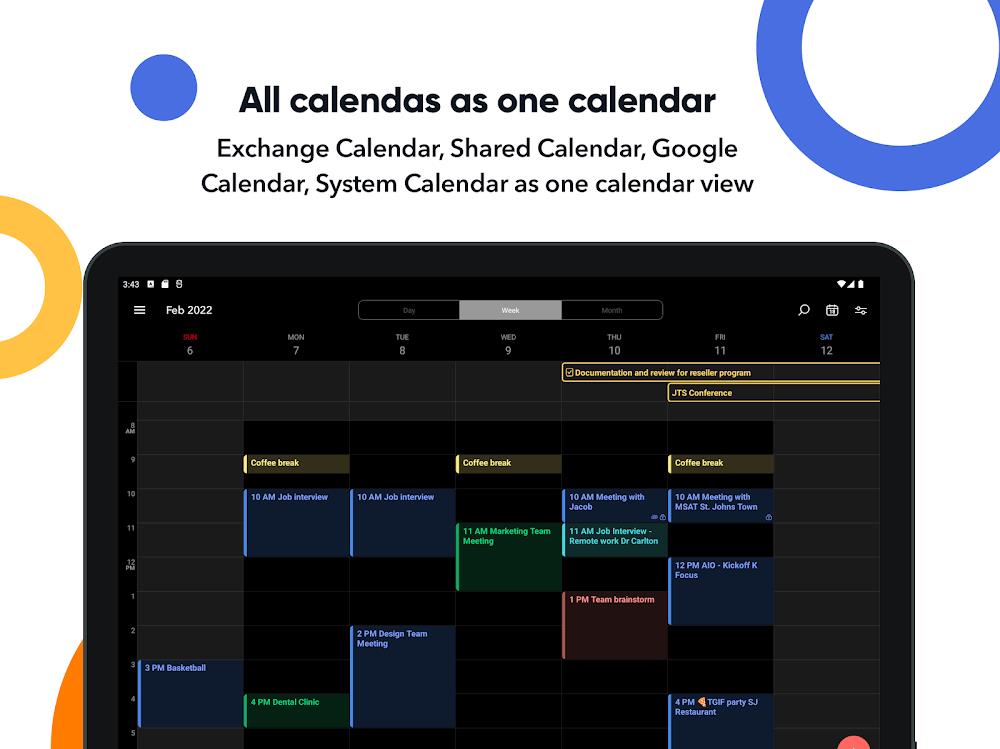
The app connects with popular productivity tools and cloud services to keep your ecosystem in sync. Supported integrations include calendar syncing for deadline visibility, cloud storage links for file access, and webhook support for custom integrations. These connections make it easy to embed Re:Work into an existing toolchain rather than forcing a radical change to how you work.
Re:Work supports configurable templates and project blueprints so you can replicate successful workflows across teams. Configure custom fields to track metrics specific to your organization, create status labels to reflect your review cycles, and save board views for different reporting needs. Customizable notifications ensure people receive only the updates relevant to their role.
Designed to perform on both mobile and desktop devices, Re:Work offers optimized synchronization to keep data consistent without consuming excessive bandwidth. The Android client provides an adaptive layout for phones and tablets, while web access supports larger screens. Offline mode caches recent changes so you can continue working and sync automatically when connectivity returns.
Security features focus on protecting organizational data while enabling collaboration. Re:Work includes role-based permissions, single sign-on (SSO) options for enterprise deployments, and encrypted data transfer. Audit logs and export tools help administrators review activity and retain records required for compliance.
Begin with a template that matches your project type, invite collaborators, and import tasks from a CSV to avoid manual re-entry. Re:Work guides you through initial setup with an onboarding checklist and sample projects that demonstrate common configurations. New users can also explore a sandbox workspace to experiment without affecting live work.
Re:Work aims to reduce administrative burden and help teams spend more time on impactful work. Its blend of task management, intelligent automation, and secure collaboration makes it a practical choice for teams seeking a balanced mix of control and flexibility.


Easy Urdu
Size:31.38M ProductivityRe:Work
Size:68.04M ProductivityOfficeMail Pro
Size:69.00M ProductivityPrint From Anywhere
Size:54.00M ProductivityWiFi Passwords: Instabridge
Size:63.45M ProductivityPerfect Ear: Music & Rhythm
Size:10.34M ProductivityInSaver
Size:13.42M ProductivityDesh Hindi Keyboard
Size:21.40M ProductivityOffice Reader
Size:33.40M ProductivityMazii: Dict. to learn Japanese
Size:100.58M ProductivityFlyer Maker
Size:36.60M ProductivityEWA: Learn English & Spanish
Size:131.30M ProductivityApril 2024 Clash of Clans Update: Unveiling a Fresh Companion, Enhanced Levels, Chat Tagging, and Be
2024-04-16Arrival of Genshin Impact 4.6 Update: 'Embers of Two Realms, Twilight of Crimson'
2024-04-16V2.2 of the Farlight 84 update introduces an overhauled Season structure, fresh in-game currency, an
2024-04-16Monster Never Cry is now accessible on both Android and iOS mobile devices.
2024-04-18PUBG Mobile Teams Up with Bentley Motors: Luxury Cars, Exclusive Collectibles, and Beyond
2024-04-18March 2024 Free Redemption Codes for Honkai: Star Rail
2024-04-18