English
PDFelement is a flexible PDF utility designed to turn static documents into editable, shareable files while reducing repetitive manual work. PDFelement converts PDFs into Word, Excel, PowerPoint and other common office formats while preserving layout and typography, and it layers AI-assisted tools—translation, proofreading and summarization—on top of those conversion functions so users can move from receipt to a usable draft much faster. The app suits professionals who prepare reports, educators handling multilingual materials, and anyone who needs a fast way to clean up scanned pages or long documents for review and sharing.
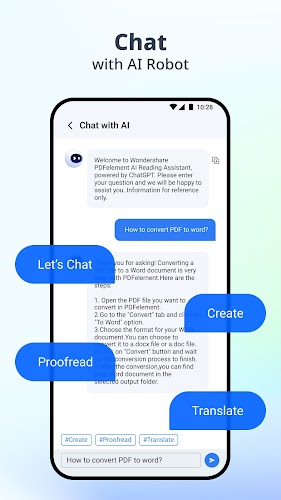
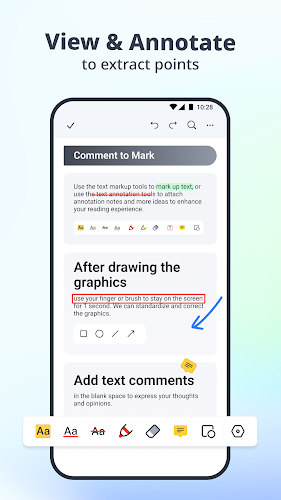
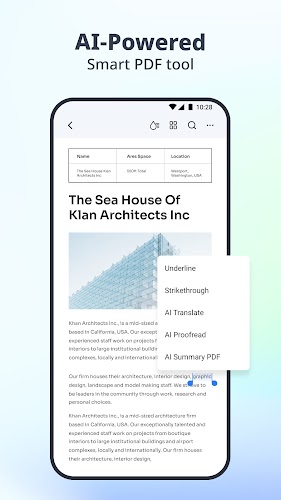
Conversion in PDFelement focuses on maintaining the original structure of a document so that tables, columns and images remain in place when you open the result in an editor. The app supports automatic text recognition for scanned pages so editable text can be produced even from images. Built-in AI translation helps convert document content between languages to speed up cross‑language workflows, while AI proofreading highlights likely spelling and grammar issues and suggests clearer phrasing. AI summarization condenses long reports or meeting notes into concise overviews to help you find the main ideas quickly. Annotation tools let you add highlights, underlines, notes, stickers and arrows with precise placement and easy removal, and batch processing lets you apply the same conversion or export settings across multiple files to save time on routine tasks.
PDFelement uses a familiar toolbar and touch-friendly gestures that make navigation and editing intuitive on phones and tablets. Pinch-to-zoom, tap-and-hold to select text, and drag-to-highlight work alongside contextual menus that expose common actions like convert, translate and annotate. Importing files is straightforward through standard Android share intents, file picker access or direct open-from storage; exported files can be saved locally or passed to another app through Android’s share dialog. The workflow naturally progresses from import to recognize/convert, to review and annotate, and finally to export; each stage offers clear controls so you can pause and return without losing progress.
Appearance and annotation styles are adjustable so PDFelement can match individual preferences or branding needs. You can set default annotation colors and stroke widths, choose compact or spacious layout views for document lists, and toggle visual cues that help with proofreading. Accessibility options include adjustable font sizes for reading mode and support for standard screen readers, plus high-contrast elements for better visibility. The interface emphasizes clear typography and consistent icons so users with varied visual needs can maintain productivity.
Working at the page level makes PDFelement practical for longer materials: you can reorder, rotate or extract pages, and preview thumbnails to jump to specific sections quickly. When converting to spreadsheets or presentations, the app attempts to map tables and images into editable components so you can focus on content refinement instead of reconstructing layouts. Repeated tasks are supported through templates and saved conversion profiles so a consistent progression—from scanned receipt to an editable report, for example—becomes a reproducible process across similar documents.
Many core features of PDFelement run offline on-device, including conversion of native PDFs, annotation and local proofreading, which is useful when you have limited connectivity or need to work on confidential files. Some advanced AI tasks may optionally use cloud-assisted models for faster or more accurate results; when offline, the app falls back to local processing where available. Performance is tuned for modern Android hardware but remains responsive on mid-range devices, with background processing for large batches to avoid interrupting everyday use.
PDFelement delivers replay value through reusable routines: saved export profiles, annotation presets and conversion templates reduce repeated steps and help teams maintain a consistent output style. Users can combine tools—convert then proofread then compress—to create compact, polished documents ready for distribution. For best results with AI translation and summarization, review the auto-generated content before finalizing important documents; AI is a productivity aid rather than a replacement for subject matter review.
Complex PDFs that include heavy graphics, unusual layouts, layered objects or uncommon fonts can be challenging to convert perfectly every time; manual cleanup may still be required. AI translations and summaries are helpful starting points but are not infallible, so critical legal, medical or technical content should be checked by an expert. Some automated annotations or layout adjustments might need manual tweaks to match specific formatting preferences, and performance on very large files can vary depending on device memory and processor speed.
PDFelement aims to streamline common document tasks while keeping controls simple and predictable, making it a practical toolkit for anyone who regularly converts, edits, translates or annotates PDFs on Android.

Habit Tracker - Habit Tick
Size:32.21M ProductivityLite Writer: Writing/Note/Memo
Size:10.90M ProductivityPDFelement
Size:60.14M ProductivityCalendar Widget
Size:4.10M ProductivityMyScript Notes for Students
Size:148.10M ProductivityIGAMES PS2
Size:48.80M ProductivityGrammarly Keyboard
Size:22.87M ProductivityMy Notes
Size:4.17M ProductivityPlanWiz
Size:46.17M ProductivitySupershift
Size:15.00M ProductivityEasy Urdu
Size:31.38M ProductivityRe:Work
Size:68.04M ProductivityApril 2024 Clash of Clans Update: Unveiling a Fresh Companion, Enhanced Levels, Chat Tagging, and Be
2024-04-16Arrival of Genshin Impact 4.6 Update: 'Embers of Two Realms, Twilight of Crimson'
2024-04-16V2.2 of the Farlight 84 update introduces an overhauled Season structure, fresh in-game currency, an
2024-04-16Monster Never Cry is now accessible on both Android and iOS mobile devices.
2024-04-18PUBG Mobile Teams Up with Bentley Motors: Luxury Cars, Exclusive Collectibles, and Beyond
2024-04-18March 2024 Free Redemption Codes for Honkai: Star Rail
2024-04-18