
English
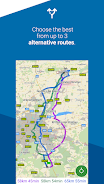
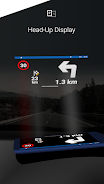
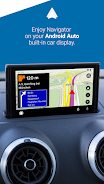
MapFactor Navigator is a top-rated GPS navigation app that allows you to easily navigate without an internet connection in over 200 countries. With free offline maps from OpenStreetMaps, you can enjoy features like voice turn-by-turn navigation, speed limits, camera warnings, and more. Whether you're driving, walking, cycling, or even in a large vehicle like a truck, MapFactor Navigator has customizable routing options to suit your needs. With frequent map updates and additional features like live HD traffic info and alternative routes, MapFactor Navigator is the ultimate travel companion that helps you safely reach your destination.
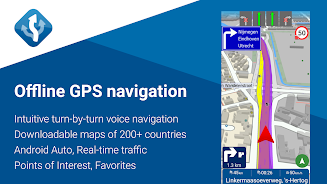
**Free Offline Navigation**: MapFactor Navigator offers free offline maps from OpenStreetMaps, allowing you to navigate without an internet connection in over 200 countries.
**Intuitive Voice Turn-By-Turn Navigation**: The app provides clear voice guidance in multiple languages, making it easy to follow directions without having to constantly look at your phone.
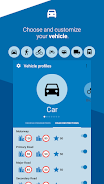
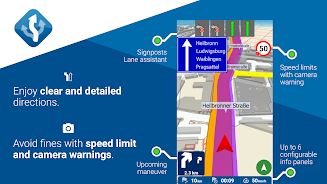
**Comprehensive Features**: With features like door-to-door route planning, speed limits, camera warnings, points of interest, and customizable routing modes for various types of vehicles, MapFactor Navigator ensures a smooth and efficient navigation experience.
**Regular Updates**: The app offers free monthly map updates, ensuring that you always have access to the latest map data for accurate navigation.
**Playing Tips**
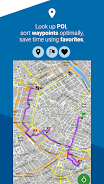
**Save Favorite Routes**: Save time by storing your favorite routes and places in the app for quick and easy access whenever you need them.
**Utilize Points of Interest**: Take advantage of the points of interest feature, including EV chargers, to easily locate nearby amenities and services while on the go.
**Customize Your Experience**: Explore the customization options in MapFactor Navigator to tailor the app to your preferences, such as choosing between 2D and 3D map display modes, day or night mode, and app color themes.
**Conclusion**
MapFactor Navigator stands out as a top-rated offline navigation app with a wide range of features and regular updates. Whether you're driving, walking, or cycling, this app provides comprehensive navigation tools to help you reach your destination efficiently. With intuitive voice guidance, customizable options, and access to free offline maps, MapFactor Navigator is a must-have for travelers and commuters alike. Download the app now to enjoy seamless navigation on the go.

Kanboo
Size:33.43M OtherAlfayOmega APP
Size:44.00M OtherRoman Empire Counter
Size:44.48M OtherLintrik : Mistis & Misteri
Size:10.00M OtherHypnotic Shorts
Size:10.00M OtherSMU Steel Summit 2026
Size:147.60M OtherDinosaur Mod For Minecraft PE
Size:22.00M OtherAI Video&Photo Maker - LikeeAI
Size:13.00M OtherCup 2026 Sticker Swap
Size:2.00M OtherPrankBeat
Size:43.00M OtherScrum Disaster
Size:39.00M OtherRolling Icon
Size:18.65M OtherApril 2024 Clash of Clans Update: Unveiling a Fresh Companion, Enhanced Levels, Chat Tagging, and Be
2024-04-16Arrival of Genshin Impact 4.6 Update: 'Embers of Two Realms, Twilight of Crimson'
2024-04-16V2.2 of the Farlight 84 update introduces an overhauled Season structure, fresh in-game currency, an
2024-04-16Monster Never Cry is now accessible on both Android and iOS mobile devices.
2024-04-18PUBG Mobile Teams Up with Bentley Motors: Luxury Cars, Exclusive Collectibles, and Beyond
2024-04-18March 2024 Free Redemption Codes for Honkai: Star Rail
2024-04-18

















Comment
Dennis Bareis
7 years later still don't like it. In AA it is jittery, no pinch to zoom and no 3D view. Seems rather than accepting feedback or trying to make the app more usable all negative feedback is called unfair, that is not an app I want to use. ###UPDATE: I REST MY CASE YOUR HONOR. I have the 3D option on, it doesn't show in 3D, clicking any and all buttons on the screen doesn't result in a 3D view. It's great how you can tell that it's not jittery, better would be if you were correct, the map rotates left and right constantly while traveling in a straight line (Waze, GM etc fine), call that what you wish. I have uninstalled the app, don't need support, dropping one star as you have confirmed the poor and likely more aggressive 'private' support.
Feb 07, 2025 04:14:27
:.:.:
Used it today in the the mountain forest roads and it work wonders. I didn't think it would show the roads up there but it did, and was I relieved. No more paper maps for me. Updates: I'm trying to love this app, but all the knick picking cost for features that should be built in is steering me away, especially when Google Maps does more for free.
Feb 06, 2025 19:04:51
A Google user
Tried others but this is the best so far, easy to use and looks great, on the other hand, there's no speed limit icon on the none route mode, please can we have this as I like to just have the map on from time to time, cheers. I don't know what's happened to the app functions or is it due to app updates but instead of directing us to the motorway that was only a few hundred yards away it sent us right through a very busy Northwest city the wrong way and then on to the motorway from there and twice has come up with route not found when I have inputted a postcode so I will be uninstalling it from all my devices as it is not up to the accuracy that I require.
Feb 06, 2025 13:17:14
Brian Davis
I think it's great.. but am I missing something? It doesn't allow me to put in addresses, just street names. That's renders it useless unless you're just looking fort a specific street. I'm using it on my Android car radio. Can anyone tell me what I'm doing wrong? Do I have to update to the TomTom maps, or is does it allows me to type in specific addresses in the pro version of this app? Which I'm not sure is available in the play store on my car radio. It's Android 6.0.1 TomTom maps do not even include some zipcodes that have been here for 20 years or more. Didn't find that out until after I paid for the offline maps thru TomTom per your suggestion. Also, your premium features, when I tried to purchase them, it would say site is unreachable. Then I tried with a new browser and after entering my credit card info it says "purchase no longer available" You're customer support was great, but regardless, almost everything within this app either didn't work or gives errors. I bought a new radio with built in updated offline gps maps. This app has too many bugs.
Feb 06, 2025 02:15:22
David Edelman
I have 7.0.51 with TomTom maps on a Samsung Galaxy A71 5G UW. Pro: My Places load onto the map faster because I switched the Map Navigation Mode from 3D to 2D. Con: The last 2 updates have caused navigation trip accuracy to dip from decent to terrible. On a test trip to home, at every intersection, it prompts me to make a right turn. This is the opposite (and incorrect way) to getting home. The app's storage cache is about 1/2 a megabyte. Please investigate. Thanks.
Feb 05, 2025 19:56:16
Jeff Space
Cant find common streets. Ive been using it for a while, most times it worked great then it stopped and would freeze. So what good is a GPS that is frozen? Full updates made no difference. It did work at one time but not anymore. My one star is my opinion you dont like, tough. 07/2020 reinstalled and tried a couple times, in city and 100 clicks out. Got it right both times. Might have improved or works well on Motorola phone.
Feb 04, 2025 14:45:43