
English
Delta Icon Pack is a minimalist icon theme that replaces your device's app icons with thousands of hand-crafted designs to give your home screen a cleaner, updated look. With Delta Icon Pack you get a large, quietly styled library that works with more than twenty launchers via a companion dashboard utility, so swapping themes and requesting missing artwork is straightforward even for users new to Android customization. The set favors muted palettes and restrained shapes to preserve recognizability while refreshing the overall interface, making it a good choice for people who want a fresh appearance without relearning familiar app visuals.
The pack contains thousands of individual icons covering the most common apps and many niche categories, reducing the number of unthemed shortcuts that interrupt a cohesive home screen. A companion dashboard acts as the central control: it detects supported launchers, guides the application process, provides a one-tap backup of current icon mappings, and offers an in-app request tool for missing icons. Designs are intentionally minimalist and adaptive where supported, which helps them integrate with a variety of wallpapers and widget layouts while maintaining a balanced visual hierarchy.
Installation is handled through the dashboard utility rather than through each launcher’s settings, which simplifies setup for most users. Typical steps include selecting your target launcher from a list, applying the Delta Icon Pack theme, and, if needed, restoring an earlier icon backup. The built-in request flow lets you mark an unthemed app and submit its details—this queues it for future updates so the developer can add matching artwork. Because launchers handle the final rendering, some options such as icon shape, masking, or adaptive rendering are adjusted inside the launcher’s appearance settings rather than in the pack itself.
Delta Icon Pack emphasizes consistent line weight, simplified glyphs, and subdued color palettes to keep attention on content rather than ornament. The approach preserves a degree of recognizability—core app symbols are simplified rather than rewritten—so users can find apps quickly. The pack plays well with a range of wallpapers and widget configurations: darker wallpapers accentuate the muted tones while lighter backgrounds emphasize the icons’ subtle contrast. Where the launcher supports adaptive icons, the pack’s artwork aligns with those guidelines to ensure clean masking and even alignment across different icon shapes.
Rather than a game-style progression system, the pack evolves through regular updates that add icons and refine existing artwork based on user requests. Personalization comes from choosing accent wallpapers, applying alternate icon shapes provided by your launcher, and from the steady accumulation of requested icons that fill gaps over time. The backup feature helps you preserve a preferred configuration when switching devices or testing new launcher setups, and continued updates keep the library growing without forcing users to redo customizations frequently.
The design philosophy prioritizes clarity and low cognitive load: icons use clear silhouettes and balanced spacing so they remain identifiable at common on-screen sizes. The dashboard is built to be simple and linear, reducing friction for users who are not familiar with launcher menus. The pack is fully usable offline once installed—no account is required to apply icons or to restore backups. For accessibility, the pack aims to keep standard glyph cues intact so that users relying on familiarity will not be impeded by heavy redesigns.
Delta Icon Pack supports more than twenty launchers through the companion dashboard, but it does require a compatible home-screen environment to apply icons; environments without theming support will continue to show default shortcuts. Some very obscure or enterprise apps may fall back to a generic icon until a requested version is provided in a future update. The pack also relies on launcher behavior for features like calendar or date-sensitive icons, so dynamic date rendering depends on combined support from both the pack and the launcher.
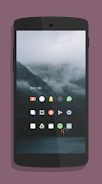
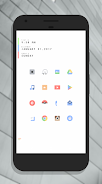
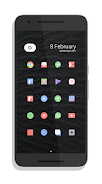
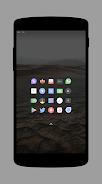
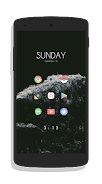
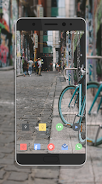
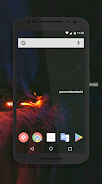
Editors and customization-focused sites have noted Delta Icon Pack for its restrained, modern aesthetic and for offering a practical alternative to more ornate themes. User-submitted screenshots in the gallery demonstrate how the set adapts across different device layouts and wallpaper choices, giving prospective users a realistic preview. Community feedback typically centers on expanding coverage for niche apps and on continuing the steady cadence of updates that keep the icon set comprehensive and practical for everyday use.
Gaming Logo Maker ESports
Size:22.75M OtherHiShort
Size:62.40M OtherSolid Color Wallpapers
Size:14.90M OtherLike Launcher heart launcher
Size:28.30M OtherNBA G League
Size:70.55M OtherCreative Launcher
Size:25.87M OtherDelta Icon Pack
Size:42.80M OtherEarth Map Satellite Live View
Size:39.85M OtherCrunchyroll
Size:56.80M OtherWin 12 Launcher
Size:13.58M OtherM Launcher
Size:13.61M OtherOS Style Launcher
Size:10.90M OtherApril 2024 Clash of Clans Update: Unveiling a Fresh Companion, Enhanced Levels, Chat Tagging, and Be
2024-04-16Arrival of Genshin Impact 4.6 Update: 'Embers of Two Realms, Twilight of Crimson'
2024-04-16V2.2 of the Farlight 84 update introduces an overhauled Season structure, fresh in-game currency, an
2024-04-16Monster Never Cry is now accessible on both Android and iOS mobile devices.
2024-04-18PUBG Mobile Teams Up with Bentley Motors: Luxury Cars, Exclusive Collectibles, and Beyond
2024-04-18March 2024 Free Redemption Codes for Honkai: Star Rail
2024-04-18

















