English
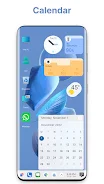
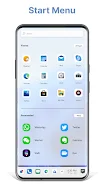
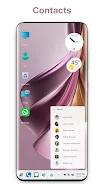
Win 12 Launcher brings a desktop-style Windows 12 look to your Android device, turning your phone or tablet into a familiar computer-like interface with a start menu, taskbar, resizable tiles and a native file explorer. If you want a productivity-focused, customizable home screen that mimics desktop navigation, this launcher offers fast performance, built-in file management with ZIP/RAR support and network sharing, and a range of widgets and themes to personalize the experience. Install Win 12 Launcher to give your device a polished PC-style layout and quick access to apps, files and system shortcuts.
⭐ Start Menu with stylish tiles, quick access to favorite apps and one-click shortcuts on the desktop.
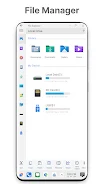
⭐ Built-in File Explorer and File Manager: browse drives, SD card, create folders, copy, paste, zip/unzip and RAR support.
⭐ Network sharing over FTP/LAN to access and share files with other devices running the same launcher.
⭐ Taskbar with removable icons, Recycle Bin behavior and optional transparency for a true desktop feel.
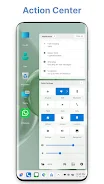
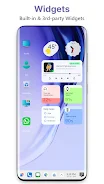
⭐ Action Center and notifier bar plus widgets including clock, weather and RAM info for at-a-glance status.
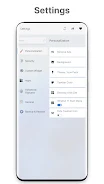
⭐ Theme and appearance options with icon packs, live wallpapers, photo tiles, lock screen and Android TV/tablet support.
✅ Win 12 Launcher delivers a familiar desktop workflow that can boost productivity for users who prefer PC-style navigation.
✅ Integrated file management eliminates the need for separate file apps and makes file operations quick and accessible.
✅ Extensive customization: change themes, icon packs, folders, taskbar colors and tile appearance to match your style.
✅ Multi-tasking is optional and configurable from settings, so you can enable or disable advanced layouts based on preference.
✅ Good device support including tablet and Android TV form factors, plus options to hide or remove icons for a cleaner home screen.
❎ Some advanced features are behind a paid option, such as adding applications directly to the Start Menu.
❎ The desktop-style layout may not suit users who prefer the stock Android experience or who use smaller phone screens.
❎ Certain options (for example multi-tasking) must be enabled manually in settings, which may require an extra setup step for some users.
HiShort
Size:62.40M OtherSolid Color Wallpapers
Size:14.90M OtherLike Launcher heart launcher
Size:28.30M OtherNBA G League
Size:70.55M OtherCreative Launcher
Size:25.87M OtherDelta Icon Pack
Size:42.80M OtherEarth Map Satellite Live View
Size:39.85M OtherCrunchyroll
Size:56.80M OtherWin 12 Launcher
Size:13.58M OtherM Launcher
Size:13.61M OtherOS Style Launcher
Size:10.90M OtherDesktop Style Launcher
Size:10.92M OtherApril 2024 Clash of Clans Update: Unveiling a Fresh Companion, Enhanced Levels, Chat Tagging, and Be
2024-04-16Arrival of Genshin Impact 4.6 Update: 'Embers of Two Realms, Twilight of Crimson'
2024-04-16V2.2 of the Farlight 84 update introduces an overhauled Season structure, fresh in-game currency, an
2024-04-16Monster Never Cry is now accessible on both Android and iOS mobile devices.
2024-04-18PUBG Mobile Teams Up with Bentley Motors: Luxury Cars, Exclusive Collectibles, and Beyond
2024-04-18March 2024 Free Redemption Codes for Honkai: Star Rail
2024-04-18