English
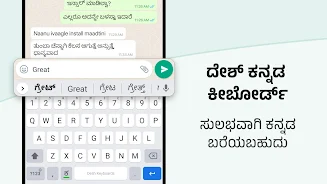
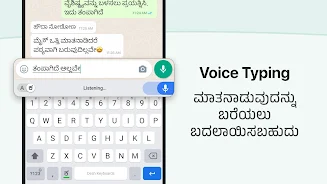
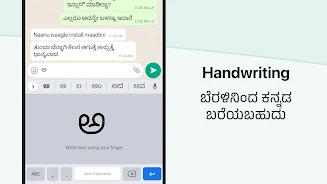
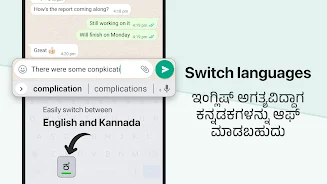
Desh Kannada Keyboard is an English-to-Kannada transliteration keyboard that converts what you type in English into readable Kannada so you can message, post and search in Kannada without learning a new layout. The app integrates across Android apps and offers predictive suggestions, GIFs, emojis and multiple colour themes to personalise everyday conversations. Installation is straightforward: enable the keyboard in system settings and switch between input methods when needed; an optional one-time premium purchase removes ads for users who prefer an uninterrupted experience.
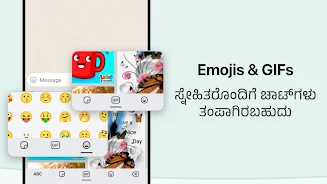
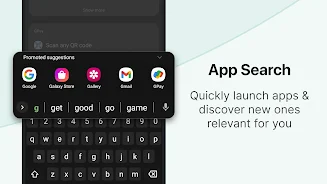
Desh Kannada Keyboard uses phonetic transliteration to let you type Kannada by entering familiar English letters and selecting from prediction choices. Predictive suggestions appear as you type to speed composition, and a built-in app search shortcut helps you open installed apps directly from the keyboard without switching contexts. The keyboard includes a dedicated area for GIFs and emojis so you can add expressive content to chats quickly, and offline top-word prediction provides reasonable suggestions when you do not have an internet connection.
The typing model is designed for ease of use: type Kannada sounds using English letters and choose the correct word from the prediction bar. Tapping a suggested word inserts it instantly, and common gestures like long-pressing the space key let you change layouts or language settings. Over time the keyboard adapts to the words you commonly use and the phrases you prefer, so suggestions become more relevant the more you type. There is no need to memorise a Kannada keypad layout; the transliteration approach keeps the learning curve low and helps you build speed and accuracy through regular use.
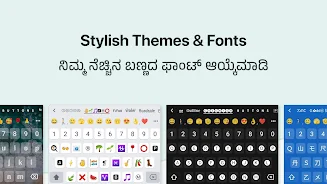
The keyboard offers several colour themes and visual options to match your taste and improve visibility while typing. Themes change the background and key accents so you can choose higher contrast styles for better readability or softer palettes for a minimalist look. You can adjust the display by selecting a layout and changing the visible suggestion density to suit your preference, which helps with both comfort and typing speed during long conversations or note-taking sessions.
Desh Kannada Keyboard is built to work consistently across messaging apps, social feeds, email, search bars and notes, so the same input method functions in all common contexts on your device. There is no separate “level” or mode for different apps; instead, the keyboard maintains a continuous typing experience with suggestions tuned to the immediate context. This simple structure reduces friction when switching between writing a short chat message and composing a longer post or note.
Offline prediction provides a selection of top words when you are not connected to the internet, enabling basic functionality in flights, rural areas or when you prefer to conserve data. When online, additional vocabulary and up-to-date suggestions are available. The keyboard design emphasises clear labels and predictable key behaviour to support a wide range of users, and the enablement process includes system prompts so users understand how to activate the input method and how Android displays standard keyboard access warnings.
Customization options such as themes, suggestion preferences and the GIF/emoji panel give the keyboard ongoing utility and encourage continued daily use. Because the app sits at the core of many everyday tasks—chatting, posting and searching—users tend to return frequently, and small improvements in predictive accuracy can save measurable typing time. The optional premium purchase removes ads and supports continued development without introducing subscription complexity.
Predictive vocabulary is intentionally limited offline and improves when the device is online, so some rare words may not be suggested without internet access. Also, Android will show a standard keyboard-access warning when you enable the keyboard, which is a system-level message intended to inform users and is not specific to this app. If you encounter issues or need help, the development team based in India encourages contact via the email option inside the app for feedback and support; updates and refinements are rolled out periodically based on user feedback.
Shortcut+
Size:5.87M ToolsDesh Kannada Keyboard
Size:35.25M ToolsDiarium
Size:18.20M ToolsZIVPN Tunnel
Size:102.20M ToolsWifi password all in one
Size:4.72M ToolsNordVPN Premium
Size:21.90M ToolsFlashcard maker
Size:18.55M ToolsTurbo Alarm
Size:7.10M ToolsEqualizer & Bass Booster - XEQ
Size:5.23M ToolsPhoto Search
Size:27.94M ToolsDrawing Studio
Size:100.10M ToolsAnnotium
Size:13.50M ToolsApril 2024 Clash of Clans Update: Unveiling a Fresh Companion, Enhanced Levels, Chat Tagging, and Be
2024-04-16Arrival of Genshin Impact 4.6 Update: 'Embers of Two Realms, Twilight of Crimson'
2024-04-16V2.2 of the Farlight 84 update introduces an overhauled Season structure, fresh in-game currency, an
2024-04-16Monster Never Cry is now accessible on both Android and iOS mobile devices.
2024-04-18PUBG Mobile Teams Up with Bentley Motors: Luxury Cars, Exclusive Collectibles, and Beyond
2024-04-18March 2024 Free Redemption Codes for Honkai: Star Rail
2024-04-18